How to Identify Upsell Opportunities in Your Store Data
95% of ecommerce professionals believe strong customer service directly contributes to incremental revenue, according to Salesforce's 2026 ecommerce statistics. That number reframes how to identify upsell opportunities. You're not hunting for a clever widget placement. You're looking for shoppers who are already signaling a need, then deciding whether an automated offer, a helpful message, or no offer at all serves them best. Get that judgment wrong and you'll interrupt researchers, discount orders that would've closed anyway, and train buyers to wait for a deal. Get it right and the extra item feels like good service, because it completes a task the shopper started.
Table of Contents
- Behavior Signals That Reveal an Upsell Opportunity
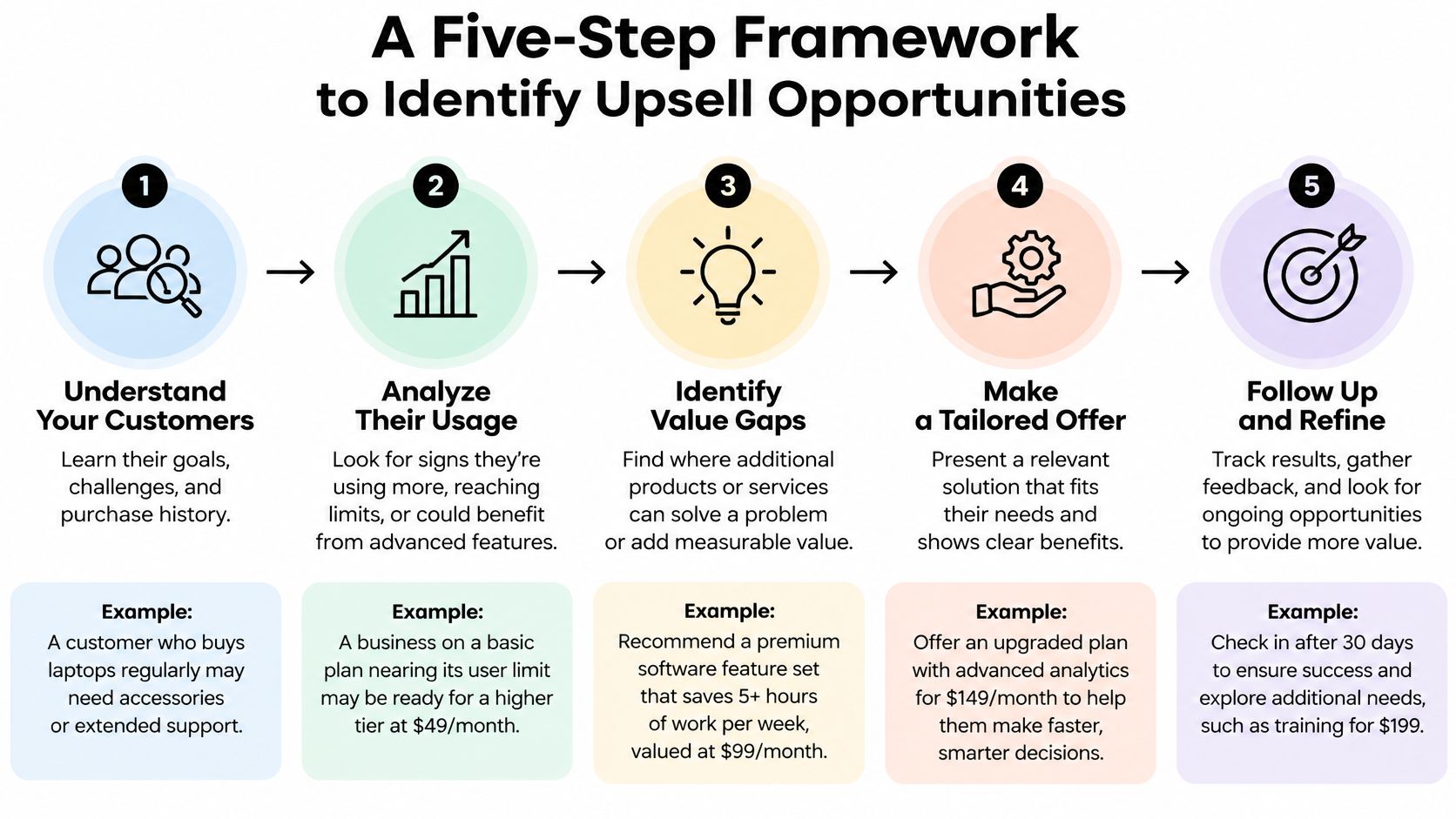
- A Five-Step Framework to Identify Upsell Opportunities
- Segments and Product Filters That Sharpen Targeting
- Trigger Moments That Convert Without Adding Friction
- Metrics That Prove an Upsell Is Working
- Assisted Upsells for B2B and Wholesale Carts
- Turn Signals Into a Tested Upsell Playbook
<a id="behavior-signals-that-reveal-an-upsell-opportunity"></a>
Behavior Signals That Reveal an Upsell Opportunity
Sitecore reported in 2025 that 10% to 30% of overall ecommerce revenue comes from product recommendations, showing how much viewed products, purchase history, and related product interest can reveal, in Sitecore's guide to personalization benefits. That range is wide for a reason. Recommendations attached to real intent pay. Generic carousels shown to everyone mostly decorate the page.
Use this table as your working checklist. Each signal has to justify a specific offer, in a specific place, or you don't show anything.
| Behavior signal | What it reveals | Offer to test | Best placement |
|---|---|---|---|
| Repeated views of one product | Item-specific high intent | Premium variant or compatible add-on | Product page |
| Core item added, then premium alternatives viewed | Upgrade decision in progress | Upgrade bundle or variant swap | Cart page |
| Search for an accessory, refill or compatible part | A missing piece in the purchase | Complementary add-on | Search results and product page |
| Item added then removed | Price or fit hesitation | Value bundle or sizing help, not a discount | Cart page |
| High-value cart idle 15-30 minutes | Distraction or checkout friction | Team alert for assisted outreach | Email or Slack alert |
| Repeated quantity edits in a large cart | Bulk or wholesale intent | Volume pricing, quote or draft order | Assisted handoff |
| Pre-sale question to support | Buying signal with a blocker | Agent-guided recommendation with cart link | Support chat |
| Returning customer browses a previously bought category | Replenishment or expansion | Replenishment bundle or loyalty upgrade | Email and on-site |
<a id="reading-the-strongest-signals-first"></a>
Reading the Strongest Signals First
Repeated views mean the shopper has picked an item and is building confidence, so a premium variant or a compatible add-on fits the moment. A core item in the cart followed by views of premium alternatives is even clearer. That shopper is mid-upgrade decision, and a clean variant swap beats a stack of unrelated suggestions. Searches for a refill, accessory, or compatible part tell you exactly what's missing. Answer that search, nothing more.
The quieter signals need restraint. An item added then removed usually signals price or fit hesitation, so sizing help or a value bundle works better than an instant discount, which teaches shoppers to remove items on purpose. A high-value cart sitting idle suggests distraction or friction, and a team alert beats an automatic markdown. Quantity edits point toward bulk thinking, while a pre-sale support question is a buying signal with a blocker attached. A returning customer browsing a category they've bought from before is often replenishing or expanding, so lead with what they already own.
A signal isn't an opportunity until you can name the shopper's unfinished task in one short sentence.
Plenty of sessions in your feed are researchers, not buyers in motion. Don't interrupt early research with a hard offer just because someone viewed two products. Open your live activity feed today, go through active sessions, and tag the three highest-intent sessions using the rows above. If you can't match a session to a row, it isn't a candidate yet.
<a id="a-five-step-framework-to-identify-upsell-opportunities"></a>
A Five-Step Framework to Identify Upsell Opportunities
I would run every candidate through the same five steps before it reaches a shopper. Skip one and you'll either target the wrong people or fail to prove the offer earned anything.
<a id="the-five-steps-in-order"></a>
The Five Steps in Order
- Capture the full session. Log product views, searches, cart additions and removals, device, traffic source, and prior order context for every session. A real-time feed records these events as they happen, which matters because yesterday's report can't help a shopper who's deciding now.
- Classify intent before you classify products. Score sessions on repeated views, dwell time, quantity changes, and returns to checkout. This separates shoppers who are closing in on a decision from casual visitors who'll resent an interruption.
- Map the signal to one narrow offer. Choose a complementary product, bundle, quantity break, service plan, or premium variant, then apply a relevance gate based on compatibility, replenishment timing, or a validated co-purchase pattern. If the relationship can't be explained in plain words, the offer doesn't ship.
- Trigger at a low-friction moment. Use the product page, cart, or a support interaction, and preserve the shopper's original path. Cap the number of recommendations. Three relevant options help, twelve create homework.
- Measure against a randomized holdout. Compare incremental revenue per session, attach rate, average order value, conversion rate, margin, and abandonment against an identical no-offer cohort before you roll anything out.
McKinsey reports that personalization leaders have reported 5-15% revenue increases and 10-30% better marketing-spend efficiency, especially through product recommendations and triggered communications, in McKinsey's research on getting personalization right. Notice the emphasis on triggered. Timing and relevance do the work, not volume of placements.
<a id="why-the-relevance-gate-matters"></a>
Why the Relevance Gate Matters
Baymard's research collection reports that 52% of desktop sites do not do enough to make cart cross-sells relevant to the cart contents, and unrelated recommendations can erode trust even when other recommendations are relevant, according to Baymard's cart and checkout research articles. One irrelevant suggestion doesn't just fail on its own. It makes the shopper doubt the good ones beside it.
Say a shopper adds a camera body and then views compatible lenses. Product affinity is present, because the lens fits the body. Purchase intent is present, because the core item is already in the cart. That session passes both tests, so a lens offer earns its place. A site-wide promotion for tripods shown to every visitor passes neither test, and any sales it touches can't be cleanly attributed anyway.
The affinity plus intent rule: Treat a live cart event as an opportunity only when product affinity and purchase intent are both present. One without the other means wait.
That rule also protects your margins. It prevents discount leakage to shoppers who were never close to buying, and it keeps your test cohorts clean enough to trust.
<a id="segments-and-product-filters-that-sharpen-targeting"></a>
Segments and Product Filters That Sharpen Targeting
The same signal means different things depending on who's sending it. Repeated views from a returning customer who bought the base product last quarter suggest replenishment. The same views from a first-time visitor on paid traffic might just be comparison shopping. Filter before you offer, using the logic behind behavioral segmentation to group shoppers by what they do, not just who they are.
<a id="segment-cuts-to-build-first"></a>
Segment Cuts to Build First
- New versus returning customers: New buyers need confidence builders, returning buyers respond to replenishment and expansion.
- B2C versus B2B accounts: Wholesale buyers think in case packs, approvals, and reorder cadence, not single add-ons.
- Traffic source: Paid, email, organic, and direct sessions arrive with different expectations and price sensitivity.
- Device and order-value band: Mobile shoppers get less screen space for offers, and high-value carts deserve human attention sooner.
Then layer in product filters. Require complementary ownership, technical compatibility, sensible replenishment timing, or a validated co-purchase pattern from past orders. Add a margin tier filter so you don't spend discount budget promoting add-ons that barely cover their costs.
McKinsey's 2021 benchmarking research, based on a survey of 100 consumer businesses conducted in February 2021, found that personalization most often produced a 10-15% revenue lift, with company-specific results ranging from 5% to 25% depending on sector and execution capability, and companies excelling at personalization generated 40% more revenue from those activities than average performers, according to McKinsey's report on the value of getting personalization right. That spread is the argument for segmentation. Averages hide losing segments inside winning ones.
<a id="mining-your-orders-and-respecting-privacy"></a>
Mining Your Orders and Respecting Privacy
Find candidate pairs in your own data. Export twelve months of orders and count how often each product pair appears together. Compare that rate with how often each product sells alone, and keep pairs bought together more often than chance predicts. Check that the same pairs are also viewed together in browsing sessions before either becomes an offer.
A 2025 survey of 3,300 consumers in the United States, United Kingdom, and Australia found that nearly two-thirds take steps to protect their privacy, while 71% still want brands to learn from their shopping behavior over time. Separate retail research reports 74% of consumers consider disclosure important when AI generates recommendations, in Attentive's 2025 consumer trends report on personalized marketing. Shoppers accept relevance they can understand. Use explainable, task-based copy like "Complete your setup" or "Add the compatible refill." Skip unexplained demographic targeting, and lean on session-level behavior instead of personally identifiable data wherever you can.
Pick three to five segment by product combinations to test first, ranked by traffic, margin, and how often the signal fires.
<a id="trigger-moments-that-convert-without-adding-friction"></a>
Trigger Moments That Convert Without Adding Friction
Timing follows cost sensitivity, and the baseline is unforgiving. Baymard's long-running research places the global average cart-abandonment rate at approximately 70.19%, based on 14 years of tracking, with 40% of U.S. shoppers abandoning because additional costs such as shipping, taxes, or fees were too high, and 18% abandoning checkout when forced to create an account, according to Baymard's checkout usability research. An upsell that muddies the total cost feeds the exact problem you're trying to fix.
| Moment | Trigger condition | Offer format | Caution |
|---|---|---|---|
| Product page | Shopper views a premium variant or compatible item | Dismissible comparison or bundle module | Never block add-to-cart |
| Cart page | Cart value or item count crosses a threshold | Complementary add-on or free-shipping nudge | Keep the total cost transparent |
| Checkout | Optional one-click add-on point | Passive checkbox or side module | No new fields, steps or account walls |
| Exit intent | Exit signal on a cart or product page | Help-first message or save-cart option | Suppress when exit is price frustration |
| Idle high-value cart | No activity for 15-30 minutes above a value threshold | Team alert for assisted outreach | Do not auto-discount |
| Support conversation | Pre-sale question about fit, compatibility or bulk | Agent recommendation using the live cart | Use cart context, not a script |
<a id="walking-the-six-moments"></a>
Walking the Six Moments
On the product page, the shopper is still choosing, so a dismissible comparison module that clarifies the premium variant helps the decision along. On the cart page, the decision is mostly made, which is why transparent bundles and threshold-based free shipping work there. Show the new total on the same line as the offer. Say a shopper adds a camera body and lingers on lens pages. A cart module offering the compatible lens with the updated total in plain view is well timed.
Checkout is the most fragile moment you own. Any offer there must be optional, easy to dismiss, and free of registration, extra fields, or added steps. The same lens popup fired while the shopper types payment details is a conversion killer, no matter how relevant the lens is. For exit intent, read the reason first. If the exit looks like price frustration, suppress the offer and provide help or a save-cart option instead. For idle high-value carts, alert your team for assisted outreach rather than auto-discounting a cart that might just be waiting on an answer. In support conversations, let the agent work from the live cart instead of a script, because the shopper's actual items beat any generic pitch.
Every trigger must preserve the shopper's original path. The offer sits beside the flow, never in front of the button that completes it.
<a id="metrics-that-prove-an-upsell-is-working"></a>
Metrics That Prove an Upsell Is Working
Set up measurement before any offer goes live, not after someone asks whether it's working. Revenue that merely correlates with an offer isn't evidence, because motivated buyers often convert anyway. Your primary metric is incremental contribution margin per eligible session, measured against an identical no-offer holdout drawn from the same eligible segment. If you're still settling your measurement basics, start with understanding key performance indicators before you build the dashboard below.
| Metric | What it tells you | Guardrail |
|---|---|---|
| Incremental revenue per eligible session | Revenue added versus an identical no-offer cohort | Must beat the holdout, not just total revenue |
| Attach rate | Share of eligible carts taking the offer | Compare new vs returning separately |
| Average order value | Basket-size effect of the offer | Watch discount-driven inflation |
| Contribution margin | Profit after discount, COGS and fees | Must stay positive after discount cost |
| Checkout conversion rate | Whether the offer blocks completion | No significant drop versus holdout |
| Cart abandonment rate | Whether added cost or friction drives exits | Watch cost-driven abandoners |
| Refund and return rate | Whether pushed upsells get regretted | Rising refunds kill the variant |
| Support contacts per 100 sessions | Whether the offer confuses shoppers | Rising contacts mean simplify the offer |
<a id="the-decision-rule-that-ends-arguments"></a>
The Decision Rule That Ends Arguments
Keep an upsell only when it beats the holdout on incremental margin without degrading checkout conversion, abandonment, refunds, or support load. A variant can post a lovely attach rate and still lose you money once discounts, returns, and extra support tickets are counted. Read attach rate and average order value separately, because a bigger basket that exists only due to a discount isn't a win, it's a margin transfer.
Run tests on the eligible segment only, and split results by new versus returning and B2C versus B2B. Fix the test window and minimum sample size before you look at results, or you'll stop every test the first time the graph flatters you. Archive every variant with its numbers, including the losers, so nobody re-runs a failed idea next quarter under a new name.
Clicks on an offer prove curiosity. Only the holdout comparison proves the offer earned money.
Close the loop weekly. One dashboard, the same eight metrics, and a logged kill or scale decision for each live test. Tests that nobody decides on just become permanent clutter in your cart.
<a id="assisted-upsells-for-b2b-and-wholesale-carts"></a>
Assisted Upsells for B2B and Wholesale Carts
In wholesale journeys, the strongest upsell trigger is often a handoff signal, not an automated widget. A buyer building a complex order doesn't need a carousel. They need pricing confirmed, case quantities checked, and a quote they can route for approval. Automated offers still have a place for simple replenishment, but the bigger expansion money usually sits behind a conversation, which is why purpose-built B2B and wholesale workflows matter more here than another recommendation engine.
<a id="signals-that-deserve-a-human"></a>
Signals That Deserve a Human
- Repeated quantity edits: The buyer is working out volume, budget, or case-pack math in the cart.
- Views of case-pack or tier-pricing pages: They're checking how price changes with volume.
- Multiple related SKUs in one cart: The order is growing in scope, not just size.
- A high-value cart abandoned by a logged-in company account: Something blocked a serious order, and it probably wasn't lack of interest.
Recent B2B research shows that 84% of surveyed decision-makers consider self-service tools critical when choosing a vendor, while major frustrations include unclear pricing, slow vendor response, and time-consuming reordering, according to Contentful's 2025 B2B buyer benchmark report. Buyers also show roughly equal preferences across in-person, remote-human, and digital self-service interactions at different buying stages. So route, don't automate everything.
Score each opportunity by account context, order size, reorder cadence, margin, and operational fit. Then pick the channel. Simple replenishment gets a self-service recommendation. Configuration questions get a targeted support message. Orders needing pricing, invoicing, or approval go to a draft-order or quote workflow.
Say a buyer repeatedly edits a 40-unit cart with three related SKUs, then goes idle. Your rep opens that exact cart, confirms case-pack pricing, applies the volume discount the buyer was hunting for, and sends a draft order for internal approval. That single handoff removes unclear pricing and slow response, the two frustrations most likely to kill the order, and it gives the buyer a larger, correct order instead of a smaller, hesitant one.
<a id="turn-signals-into-a-tested-upsell-playbook"></a>
Turn Signals Into a Tested Upsell Playbook
Run a two-week validation sprint before you scale anything. Two weeks is enough to learn whether a signal holds up, and short enough that a bad offer can't do much damage.
<a id="the-two-week-sprint"></a>
The Two-Week Sprint
Week one
- Pick two signals from the behavior table.
- Define one narrowly relevant offer for each.
- Set the eligible segment and a randomized holdout.
- Configure the triggers from the trigger table.
Week two
- Review the metric table and kill any variant that fails to beat the holdout on incremental contribution margin.
- Scale the winner and record it in a playbook with six fields, signal, segment, offer, trigger, metric, and owner.
The sprint runs on a live feed, and that's where our tooling fits. Cart Whisper | Live View Pro shows real-time cart activity, including which products customers view, what they add to and remove from their carts, and where they hesitate or get stuck. Its Cart ID feature lets your team open a customer's exact cart to help them finish an order, high-value idle cart alerts route stalled orders to the right person, draft orders support assisted sales, and B2B company details appear right on the cart.
The Free plan costs nothing to install and includes 100 carts per month, converting carts to draft orders, a live activity feed, smart cart widgets, and exit intent popups, so you can run the first sprint before spending anything. Install the feed, watch one full day of live cart activity, tag three upsell candidates with the signal table, and schedule your first holdout test before any offer goes live.
You now have the signals, segments, triggers, and guardrails to spot real opportunities instead of guessing, and Cart Whisper | Live View Pro gives you the live cart and browsing feed, Cart IDs, and idle-cart alerts to act on them while the shopper's still deciding. Install it today, tag your first three high-intent sessions, and let your first holdout test tell you which upsell earns its place.