How to Implement Quality Assurance: 7-Step Roadmap
A test suite with every check green can still bleed revenue on launch day. Most software and ecommerce teams treat quality assurance as a frantic pre-release inspection, chasing higher test counts and wider code coverage while real shoppers hit silent tracking drops, broken discount handoffs, or stalled checkout widgets.
When you learn how to implement quality assurance as a lifecycle control system instead of a final bug hunt, the whole dynamic flips. You stop asking whether the code compiles cleanly in staging and start verifying whether critical customer journeys and delivery pipelines stay healthy in production.
I'd build any new QA program from the customer backward. Whether you manage a single Shopify storefront, a multi-store agency portfolio, or a B2B wholesale portal, the sequence stays the same: define measurable quality requirements, tie ownership to observable workflows, layer your automation for fast feedback, and guard releases with hard evidence.
Table of Contents
- Your QA Implementation Roadmap in Seven Phases
- How to Assess Quality Gaps and Set Targets
- How to Design Workflows and Assign Ownership
- How to Choose Tools and Build the Test Stack
- How to Set KPIs and Dashboards That Drive Action
- Roll Out in Waves and Train the Team
- Start With One Critical Journey This Week
<a id="your-qa-implementation-roadmap-in-seven-phases"></a>
Your QA Implementation Roadmap in Seven Phases
Treating quality assurance as a last-minute gate guarantees expensive rework. Real quality control manages the process that builds and ships the product, catching drift before a shopper ever notices.
Back in May 1924, Walter A. Shewhart of Bell Telephone Laboratories introduced the first modern control chart, establishing statistical process control to separate normal day-to-day variation from special causes that demand corrective action, as detailed in ASQ's history of quality. Shewhart later formalized those economic and statistical principles in his 1931 book, Economic Control of Quality of Manufactured Product.
That century-old shift from subjective checking to repeatable measurement maps directly onto digital commerce. A Shopify operator can track checkout-error rate, time to answer an assisted-sales request, the share of carts converted cleanly into draft orders, widget-trigger accuracy, data-export completeness, and sessions missing activity events. Instead of panicking over one isolated glitch, your team establishes a baseline, defines an acceptable operating range, and investigates unusual spikes. Recurring abandonment after a specific product-page event points to systemic friction, whereas a sudden jump in missing cart events flags a tracking or integration defect.
<a id="the-seven-phases-at-a-glance"></a>
The Seven Phases at a Glance
Before committing engineering hours to any single tool or test suite, map the full sequence so leadership sees how each stage feeds the next.
| Phase | Key activities | Deliverable | Typical duration |
|---|---|---|---|
| 1. Scope and baseline | Map critical workflows, collect incident and defect history, record current test coverage and release process | Baseline report with top 10 quality risks | 1-2 weeks |
| 2. Requirements and goals | Write measurable quality requirements, acceptance thresholds, owners and release gates | Requirements matrix with thresholds, owners and release gates | 1-2 weeks |
| 3. Workflow and ownership design | Map requirement-to-release flow, define roles, RACI, severity matrix and triage SLAs | QA operating model and RACI chart | 2 weeks |
| 4. Tooling and test stack | Select CI, test management, observability and telemetry tools; define automation layers | Tool shortlist, test stack diagram and automation plan | 2-3 weeks |
| 5. Metrics and dashboards | Baseline delivery and business-facing QA metrics, set risk budget and review cadence | QA dashboard and release gate rules | 1 week |
| 6. Pilot rollout and training | Run one team or journey in shadow mode, train roles, refine templates | Pilot report and training pack | 4-6 weeks |
| 7. Continuous improvement | Review escaped defects, flaky tests, incident trends and update requirements | Monthly QA review and improvement backlog | Ongoing |
These phases aren't rigid waterfall blocks. A lean ecommerce team can run the first three phases in four to six weeks by keeping documentation tight and focusing strictly on revenue-bearing flows like search, cart updates, checkout, payment, consent, support, and B2B account handling.
Pick your starting phase based on what you already have on paper. If your team has never logged defect history or mapped core journeys, start at Phase 1; if your incident log is already solid, open at Phase 2. When pitching this roadmap to a sponsor, frame the sequence around risk reduction and faster recovery rather than hiring a massive testing department.
<a id="how-to-assess-quality-gaps-and-set-targets"></a>
How to Assess Quality Gaps and Set Targets
You can't improve quality until you measure where your current workflows fail customers. Start by scoping every path that can damage revenue or erode trust: product browsing, search, add-to-cart, checkout, payment processing, consent management, accessibility, support-assisted checkout, and B2B order handling. If you haven't documented those touchpoints yet, our guide to ecommerce customer journey mapping shows how to trace shopper behavior from first view to order confirmation.
Gather your baseline from six concrete sources: customer support tickets, production incident logs, escaped defect records, monitoring alerts, existing test runs, and targeted manual QA samples. Together, those artifacts expose where bugs slip through, which is rarely where developers assume they happen.
Next, translate those gaps into written quality requirements. The IEEE 1061 software quality metrics framework outlines this lifecycle discipline clearly: establish measurable quality requirements first, then identify, implement, analyze, and validate product and process metrics across the full software lifecycle rather than adopting a one-size-fits-all metric checklist. Every requirement needs four companions: an acceptance threshold, a test method, a named owner, and a release gate.
<a id="worked-quality-requirements-for-critical-workflows"></a>
Worked Quality Requirements for Critical Workflows
The matrix below shows how an ecommerce team converts vague hopes like "cart tracking works" into enforceable operational targets.
| Critical workflow | Measurable requirement | Acceptance threshold | Test method | Owner |
|---|---|---|---|---|
| Live activity feed accuracy | Sessions, page views and product views match source events | Within tolerance set from the 4-week baseline; zero unexplained gaps in sampled sessions | Event log reconciliation plus synthetic shopper | QA lead |
| Unique Cart ID consistency | One shopper session maps to one Cart ID across widgets and support views | 100% of sampled carts; zero duplicate active IDs | Contract test plus database query | Backend engineer |
| Shopify event ingestion | Add-to-cart, remove-from-cart and checkout events arrive once and in order | 100% of test events ingested once; zero duplicates on replay | Webhook replay and idempotency test | Integration engineer |
| CSV export integrity | Exported rows match dashboard totals and include all required fields | 100% row count match; zero missing required fields | Automated export reconciliation | Data analyst |
| Draft-order creation | Cart converts to draft order without losing line items, discounts or customer data | 100% of test cases; zero Sev-2 defects in release | End-to-end browser journey | QA engineer |
| Widget targeting | Exit-intent and support widgets appear only to eligible audiences | 100% of rule cases; zero consent violations | Rule-based test matrix | Product manager |
| B2B account-data handling | Company names and logged-in details show only to authorized users | 100% of role-based access cases | Security and access test | Security lead |
<a id="building-traceability-and-realistic-90-day-goals"></a>
Building Traceability and Realistic 90-Day Goals
Once your requirements exist, build a traceability matrix linking each one to the specific unit, contract, integration, end-to-end, security, accessibility, and performance tests that verify it. Run deterministic unit and schema-validation tests on every commit, execute Shopify API contract tests and database migration checks in CI, and reserve slower browser journeys for high-value paths such as add-to-cart-to-draft-order conversion. Pair pre-release tests with production telemetry for event loss, duplicate events, stale sessions, export failures, checkout-assistance errors, and privacy incidents, backed by canary releases, feature flags, rollback criteria, and synthetic shoppers.
Set 90-day targets tied strictly to observable outcomes: cut escaped Sev-1 and Sev-2 defects, raise event reconciliation accuracy, shorten time to detect production breaks, and close your top risks first. Review escaped defects by requirement, severity, and detection stage, and run a formal root-cause analysis on every Sev-1 or Sev-2 escape.
Practical rule: Never set a quarterly goal to inflate code-coverage percentages or total test counts while checkout and draft-order journeys stay unverified. Teams can easily pad unit tests to push coverage higher while critical shopper flows remain completely blind.
Walk into your QA kickoff meeting with three items ready on the table:
- Baseline evidence: A one-page summary of recent support escalations, incident logs, and escaped defects.
- Draft requirements matrix: Measurable thresholds and test methods for your top five to seven critical workflows.
- Named accountability: One individual owner assigned to every single requirement before a line of test code gets written.
<a id="how-to-design-workflows-and-assign-ownership"></a>
How to Design Workflows and Assign Ownership
A Shopify store pushes a theme update on Tuesday morning. Every automated checkout assertion passes in staging, yet by afternoon mobile conversion dips, UTM attribution drops off on paid traffic, and support agents cannot see what items sit in a caller's cart. The code worked in isolation. The business workflow failed.
Map the full customer journey before you draw a single box on an org chart. Write down every step a shopper takes from search and product view through cart modification, checkout, payment, consent, and post-purchase support, including assisted sales and B2B draft orders. The stakes justify the effort: Capgemini's World Quality Report ecommerce guidance cites Baymard Institute's meta-analysis of 49 studies putting the average cart-abandonment rate at 70.22%, with 48% of shoppers naming unexpected costs late in checkout as their reason for leaving. Payment security standards add a second obligation: every script running on a payment page must be inventoried, authorized, and integrity-checked, so script governance becomes a standing QA task rather than something left to periodic security audits.
A checkout that passes its assertions is still commercially defective if it breaks attribution, fires an exit-intent popup against consent settings, or leaves a support agent blind to the shopper's session state. Support visibility is a quality signal in its own right: one merchant reviewing checkout-assistance tooling says it helped them "identify why so many carts were getting abandoned in the first place" (Wheelwiz, Shopify App Store). Tie code assertions to behavioral evidence through journey checks, production observability, accessibility regression, payment recovery drills, and privacy-safe session logs that let support reproduce an issue without exposing unnecessary personal data.
<a id="from-requirement-intake-to-post-release-verification"></a>
From Requirement Intake to Post-Release Verification
Anchor every change to a seven-stage lifecycle so work moves predictably from backlog to live traffic.
- Risk review: In sprint refinement, the product owner and QA lead flag whether a ticket touches payment scripts, consent banners, cart state, or B2B permissions.
- Test design: Engineers and testers convert acceptance criteria into test cases, edge-case matrices, and observability checks before development wraps up.
- Environment and data: Seed staging with realistic, privacy-safe catalogs, B2B tiers, discount rules, and test payment tokens so nobody tests against stale dummy data.
- Execution: Automated checks run in CI while exploratory testers inspect cross-device cart persistence, analytics firing, and accessibility.
- Defect triage: Route every bug through the severity matrix below against a fixed triage SLA.
- Release sign-off: The release manager verifies objective evidence against the gate instead of accepting a verbal "looks good" in Slack.
- Post-release verification: Synthetic shoppers and production event monitors confirm live carts, webhooks, and payment scripts behave as they did in staging.
Keep the severity definitions on the same page as the workflow so triage never turns into a debate:
| Severity | Example | Triage rule |
|---|---|---|
| Sev-1 | Checkout or payment down for all shoppers | Stop the line, halt the release |
| Sev-2 | Core journey broken for a segment, such as mobile checkout or draft orders | Fix before deploy or roll back |
| Sev-3 | Isolated edge-case defect with a workaround | Schedule into the current or next sprint |
| Sev-4 | Cosmetic or copy issue | Backlog only, never blocks a deploy |
<a id="role-ownership-and-lean-team-adaptation"></a>
Role Ownership and Lean Team Adaptation
Translate the lifecycle into a RACI chart covering seven roles. One boundary stays fixed at every team size: product owners are accountable for acceptance criteria, and QA is accountable for verification evidence.
| Role | Accountable for | Evidence owed at the gate |
|---|---|---|
| QA lead | Test strategy, triage SLA, gate calls | Severity log, escaped-defect review |
| Test engineers | Journey automation, exploratory passes | Test cases, CI results |
| Developers | Unit and contract tests, defect fixes | Passing builds, contract check output |
| Product owner | Acceptance criteria, prioritization | Signed-off requirements, risk flags |
| Support lead | Reproducing customer issues, feeding friction back | Session logs, reproduction steps |
| Security and privacy owner | Script authorization, access controls, consent rules | Script inventory, access review |
| Release manager | Gate enforcement, deploys, rollback | Sign-off record, release checklist |
Running lean with zero dedicated QA headcount? Split the RACI duties between your product owner and developers, then appoint one rotating or permanent QA coordinator holding a protected two-hour weekly block for defect triage and release sign-off. Keep the workflow, RACI, severity matrix, and triage SLAs on a single shared page. When a release looks risky, everyone already knows who calls the shot.
<a id="how-to-choose-tools-and-build-the-test-stack"></a>
How to Choose Tools and Build the Test Stack
Most QA tool evaluations go sideways because teams compare glossy vendor feature matrices instead of asking a much simpler question: what verifiable evidence does this tool produce? A bloated platform that generates flashy PDFs while missing Shopify webhook retries costs you twice, once in licensing and again in production outages.
Build your shortlist across seven core categories: source control and CI (such as GitHub Actions or GitLab CI), test management (TestRail or Qase), API and contract testing (Postman or Pact), browser automation (Playwright or Cypress), production observability (Datadog or Sentry), feature flagging (LaunchDarkly), and privacy-safe session or event tracking. Score each candidate against six criteria: Shopify and webhook coverage, native CI integration, test-data governance, reporting clarity, ongoing maintenance cost, and a clean exit path if you outgrow it. Browser automation choices deserve extra scrutiny across mobile WebViews and Safari quirks, so review common browser compatibility issues before locking in your device matrix.
<a id="layering-the-test-stack-for-speed-and-stability"></a>
Layering the Test Stack for Speed and Stability
Resist the temptation to automate everything through the user interface. UI suites break easily and run slowly. Structure your test stack in four distinct layers, running the fastest checks first and parallelizing independent suites to keep developer feedback loops tight:
- Static checks and schema validation on every commit: Linting, TypeScript or type checks, JSON schema validation for event payloads, and secret scanning catch structural errors in seconds.
- API, contract, and database migration tests in CI: Verify Shopify API payloads, webhook schemas, role-based B2B access rules, and forward-and-backward database migrations before code merges.
- Small, stable browser journeys: Limit Playwright or Cypress end-to-end suites strictly to revenue-critical flows like add-to-cart, checkout, payment, widget triggering, and draft-order creation.
- Production telemetry and synthetic monitors: Track event loss, duplicate events, stale sessions, CSV export failures, and privacy incidents continuously after deployment.
Flaky tests destroy trust faster than having no tests at all. Whenever an automated check fails intermittently, quarantine it immediately out of the main merge gate, but never let quarantined tests rot forever. Every quarantined test requires a named owner and a strict expiry date to either fix the race condition or delete the test.
<a id="guardrails-for-ai-assisted-test-generation"></a>
Guardrails for AI-Assisted Test Generation
Vendors pitch AI test generators as an instant shortcut to full coverage, yet real-world adoption data tells a far more cautious story. According to the 2025 World Quality Report, based on more than 2,000 executives across 22 countries and 10 sectors, 67% of respondents cite data-privacy risk as a barrier, 64% flag integration complexity, and 60% report hallucination or reliability concerns. Only 15% of organizations have successfully scaled AI across the enterprise, while 11% reported not adopting AI at all, up from 4% in 2024.
Those numbers point to a clear engineering mandate: write governance rules before buying AI testing tools. Decide upfront which test data may ever touch an AI model, mandate synthetic or masked datasets so customer identifiers and checkout payloads never leak, and require independent validation of every generated assertion. No AI-authored test should become a release gate without explicit human approval, and teams should track false confidence, flaky runs, and missed defects against AI-generated suites.
Restricting AI autonomy early protects your pipeline far more effectively than chasing maximum automation. Start with isolated, low-risk test generation on synthetic data and require reproducible evidence before letting AI touch checkout scripts or customer identifiers.
Turn your shortlist into a focused 30-day automation plan. Spend week one wiring commit-level schema checks and CI integration; week two adding Shopify webhook contract and migration tests; week three scripting three rock-solid browser journeys; and week four instrumenting production telemetry and flaky-test quarantine rules.
<a id="how-to-set-kpis-and-dashboards-that-drive-action"></a>
How to Set KPIs and Dashboards That Drive Action
Measuring only pre-release test pass rates creates a dangerous illusion of safety. A team can celebrate a clean staging build on Friday and spend Saturday untangling duplicate draft orders in production. Operational accountability requires pairing delivery-health metrics with customer-facing quality indicators.
Start by collecting at least four weeks of baseline data before setting any performance targets. Copying external "elite" benchmarks from software conference decks hides your real bottlenecks and encourages teams to game numbers instead of fixing root causes. According to IBM's overview of DORA metrics, four indicators anchor delivery performance: deployment frequency, lead time for changes, change failure rate (the share of deployments requiring remediation), and failed-deployment recovery time (how quickly teams restore service after a failed release). That same overview highlights the 2021 State of DevOps research showing that continuous testing is a strong predictor of successful continuous delivery.
Before code ever reaches production, make sure your continuous testing pipeline validates event ordering and idempotency so replaying the same cart webhook never generates duplicate activity rows or duplicate draft orders. Test resilience deliberately against webhook delays, automatic retries, API rate limits, partial third-party outages, timezone shifts, and mobile browsers. To ground your metric definitions across teams, our walkthrough on understanding key performance indicators breaks down how to separate actionable indicators from vanity numbers.
<a id="pairing-delivery-indicators-with-business-quality-metrics"></a>
Pairing Delivery Indicators With Business Quality Metrics
DORA metrics tell you how safely and quickly you ship; business-facing QA indicators tell you whether shoppers experience a working store. Track both sets side by side.
| Metric | What it measures | Example baseline or target | Review cadence |
|---|---|---|---|
| Deployment frequency | How often the team ships to production | Baseline over 4 weeks; target set after baseline | Weekly |
| Lead time for changes | Time from commit to production | Baseline over 4 weeks; target set after baseline | Weekly |
| Change failure rate | Share of deployments requiring remediation | Baseline; stay inside agreed risk budget | Weekly |
| Failed-deployment recovery time | Time to restore service after a failed release | Baseline; target under 1 hour for critical journeys | Per incident |
| Shopify events reconciled | Share of cart and checkout events that match source records | Baseline; target agreed at kickoff, close to 100% for critical events | Daily |
| Median activity-feed freshness | Delay between shopper action and visible activity | Under 60 seconds | Daily |
| Cart-to-draft-order success | Share of assisted-sales conversions completed without error | 99.5% | Weekly |
| CSV reconciliation error rate | Mismatch rate between export and dashboard totals | Baseline; target zero mismatches on required fields | Weekly |
| Escaped Sev-1 and Sev-2 defects | Critical defects found after release, grouped by requirement | Zero Sev-1; downward trend for Sev-2 | Monthly |
<a id="three-dashboard-views-and-hard-release-gates"></a>
Three Dashboard Views and Hard Release Gates
Never dump all nine metrics onto one cluttered screen. Split your reporting into three purpose-built views so every stakeholder gets an answer fast:
- Executive view: A one-minute digest showing four-week trends for change failure rate, escaped Sev-1 and Sev-2 counts, and business reconciliation health against your risk budget.
- Team view: A live board for daily stand-ups listing broken CI suites, quarantined flaky tests with expiry countdowns, open defects by severity, and daily event freshness.
- Release-gate view: A pass-or-block checklist a release manager can audit in five minutes before approving a production push.
Metrics only change behavior when they carry enforcement power. Set a clear risk budget and automatically block a release whenever any of four conditions trigger: a critical-path test fails, schema compatibility breaks, privacy controls regress, or the rolling change failure rate breaches your agreed budget. Pair those gates with a tight human rhythm: review daily failures in stand-up, triage defects weekly by root cause, and run a monthly trend review so fast shipping never outpaces your ability to recover.
<a id="roll-out-in-waves-and-train-the-team"></a>
Roll Out in Waves and Train the Team
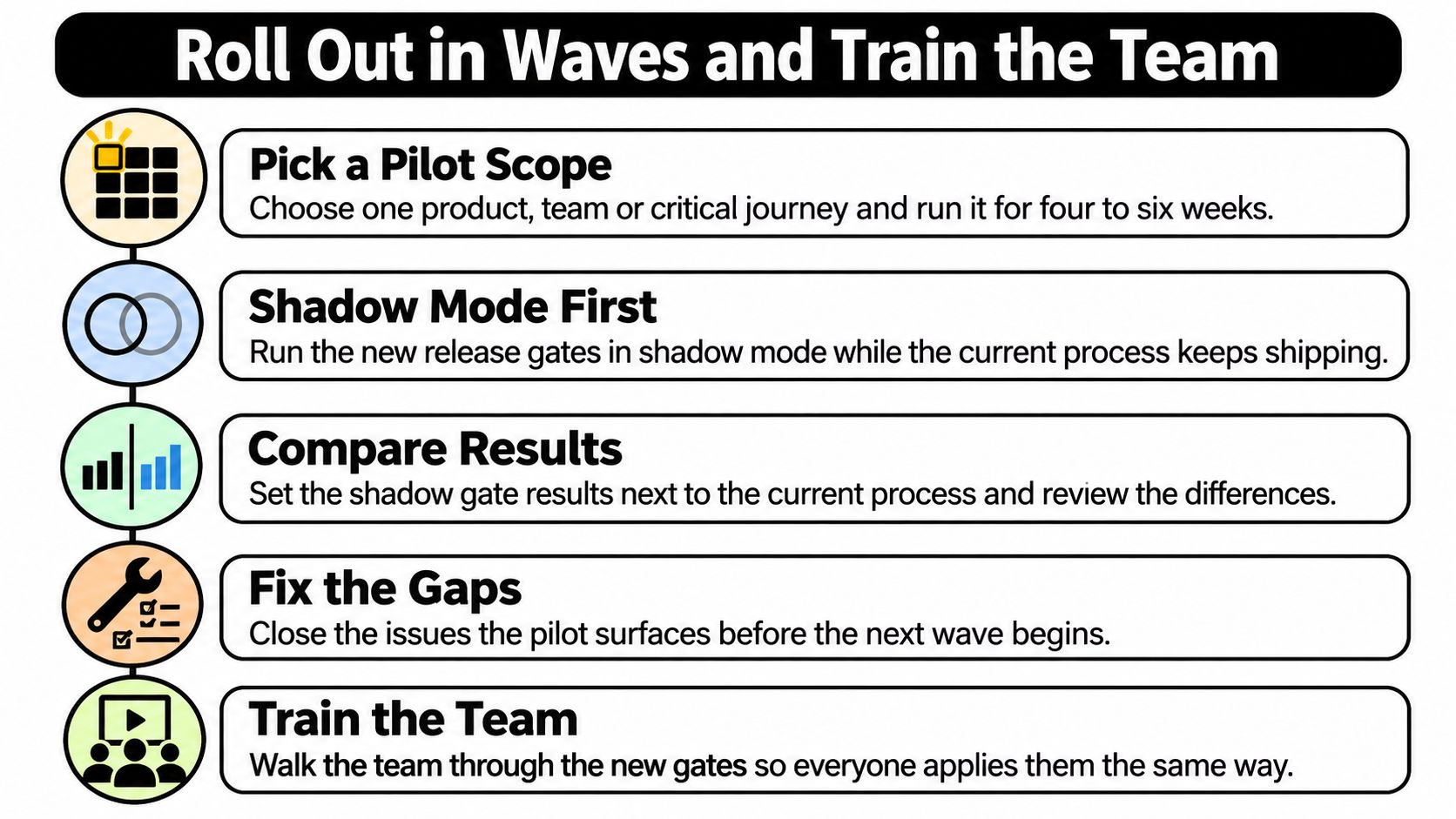
Rolling out new release gates across every repository and storefront on day one almost always sparks pushback and quiet workarounds. Instead, deploy your QA operating model in waves. Select one product, squad, or revenue-critical journey for a four-to-six-week pilot, and run the new release gates in shadow mode first while the existing shipping process continues uninterrupted.
Comparing shadow-mode verdicts against live production outcomes reveals whether your gates catch real bugs or just generate noisy false alarms. Fix every template gap and brittle check before expanding to the next team.
<a id="role-based-training-and-shared-templates"></a>
Role-Based Training and Shared Templates
Generic slide decks put engineering teams to sleep and rarely change Monday morning habits. Train each role hands-on around the exact work they perform:
- Testers and QA analysts: Run a 60-to-90-minute interactive workshop writing measurable requirements, edge-case matrices, and severity classifications against real past incidents.
- Developers: Host a focused 45-minute working session on writing Shopify contract tests, setting up feature flags, and diagnosing flaky test quarantines.
- Customer support and assisted-sales reps: Walk through an operational runbook covering how to reproduce a shopper's session safely, grab the relevant cart identifier, and file a complete defect report in under three minutes.
Standardize the paperwork across squads so nobody reinvents checklists from scratch. Every team should pull from the same seven lightweight templates: a QA plan, test case format, release gate checklist, defect root-cause analysis, dashboard review agenda, incident postmortem, and new-hire onboarding checklist.
Team habit: Keep release gates small, make defects visible without blame, and recognize the engineer or support rep who catches a subtle checkout break early just as visibly as the teammate who ships the fastest.
<a id="deciding-whether-to-expand-with-pilot-exit-criteria"></a>
Deciding Whether to Expand With Pilot Exit Criteria
At the end of the pilot window, resist expanding on gut feel. Evaluate the pilot against six objective exit criteria to make a clear expand, pause, or redesign call.
| Criterion | Pass condition | Evidence |
|---|---|---|
| Gate accuracy | Shadow gates flag every Sev-1 and Sev-2 defect caught in live checks with zero false release blocks | Pilot report comparison table |
| Escaped defects | No new Sev-1 defects escape the pilot journey | Defect log by requirement |
| Flaky tests | Quarantined tests each have an owner and an expiry date | Quarantine register |
| Training | Every role has completed its session and used its runbook once | Attendance and runbook sign-off |
| Templates | Core templates revised from pilot feedback and approved | Template version history |
| Review cadence | Two monthly QA reviews held with actions owned and dated | Meeting notes and action log |
Once the pilot passes, keep momentum alive with a recurring monthly QA review. Examine escaped defects, flaky test trends, and production incidents together, and assign every improvement action a single owner and a firm due date. Publish a concise pilot report at the close of Wave 1 that records the formal verdict: expand to Wave 2, pause to repair a broken gate, or redesign the template that slowed developers down.
<a id="start-with-one-critical-journey-this-week"></a>
Start With One Critical Journey This Week
Grand QA transformations stall in committee meetings; narrow operational experiments ship results in seven days. Pick one revenue-critical journey this week: cart-to-checkout, payment recovery, B2B cart-to-draft-order, or support-assisted checkout.
Write five measurable requirements for that single flow using the structure from your requirements matrix, complete with acceptance thresholds, named owners from your RACI, and explicit release gates. Next, run a ten-session baseline using the live session evidence your storefront already captures, including page views, product views, cart edits, device types, and UTM parameters, confirming that every support interaction links cleanly back to the shopper's exact cart. Execute three focused tests against those requirements and publish one live metric onto a shared team dashboard.
When you tie live behavioral visibility directly into quality assurance, root causes stop hiding behind vague conversion drops. As Wheelwiz noted on the Shopify App Store, "Not only does it help me assist customers during checkout, but it helped me identify why so many carts were getting abandoned in the first place." App support is provided by Cart Whisper, giving Shopify merchants a direct partner when connecting real-time cart behavior to assisted-sales workflows and defect triage.
Lock in a 30-day review right now with a clear decision rule: expand your QA gates to a second journey if this flow clears the release gate twice in a row, and stop to fix the underlying process if it fails even once for the same root cause. Feed every surprise from your ten-session baseline straight back into your requirements matrix so your thresholds reflect real shopper behavior. Before you close this tab, write down three things on your calendar: the journey you're starting with, the single owner accountable for it, and your first review date.
If you want real-time visibility into the shopper journeys your QA program is built to protect, Cart Whisper | Live View Pro gives Shopify merchants live activity feeds, unique Cart IDs, cart-to-draft-order conversion, B2B account details, and CSV exports in one view. Those live behavioral records make it straightforward to baseline cart friction, verify assisted-sales workflows, and reconcile storefront events against real customer sessions. Explore the full feature set and install Cart Whisper | Live View Pro on the Shopify App Store to turn live cart activity into measurable quality assurance and revenue recovery.