How to Recover Abandoned Carts Without Blanket Discounts
Most ecommerce guides give the same answer to how to recover abandoned carts: fire off an automated email an hour later, drop a discount code in the second message, and celebrate the recovered revenue inside your email dashboard. That playbook is so standard that in 2025, 68% of abandoned carts among 1,000 direct-to-consumer brands triggered a follow-up email, according to Rejoiner's abandoned cart email statistics.
I'd push back on that default setup. Treating every left-behind cart as a lost sale that needs a coupon burns margin, trains repeat shoppers to wait for codes, and annoys people who were only window-shopping in the first place. Worse, most dashboards give your recovery emails credit for orders that would have closed anyway.
Real cart recovery starts before a single message goes out. You separate casual browsers from high-intent buyers who hit real friction, fix hidden costs and delivery surprises on the page, and judge every recovery message by incremental orders against a holdout group rather than vanity open rates.
Table of Contents
- Match Each Abandoned Cart to Its Likely Cause
- Set Up Cart Tracking and Intent Tiers
- Fix the Blocker on Site Before Offering a Discount
- Protect Trust When You Contact Shoppers
- Run a Timed Recovery Sequence Instead of One Reminder
- Measure Incremental Orders and Start This Week
<a id="match-each-abandoned-cart-to-its-likely-cause"></a>
Match Each Abandoned Cart to Its Likely Cause
Nearly every store owner assumes an abandoned cart means a shopper balked at the price. The numbers tell a different story. Across 50 separate studies compiled in the Baymard Institute cart abandonment benchmark, the average documented cart abandonment rate sits at about 70%, yet among US online shoppers who abandoned during the prior three months, 42% said they were merely browsing or not ready to buy.
That single split changes how you diagnose lost revenue. Almost half of the carts sitting in your admin panel aren't checkout failures at all, and emailing those visitors a coupon only chips away at future margins.
The remaining shoppers abandoned for concrete friction reasons you can fix. Combining the Baymard Institute cart abandonment list with its benchmark data shows where purchase-intent shoppers drop out and what to test first.
| Likely cause | Reported share | First fix to test |
|---|---|---|
| Just browsing or not ready to buy | 42% of all abandoners | Saved-cart reminder or no message |
| Unexpected extra costs (shipping, tax, fees) | 40% of non-browsers | Show total cost before checkout |
| Slow delivery | 20% of non-browsers | Show delivery estimate on cart and checkout |
| Lack of trust with card details | 19% of non-browsers | Display trusted payment methods and security cues |
| Forced account creation | 18% of non-browsers | Offer guest checkout |
| Checkout too long or complicated | 17% of non-browsers | Remove unnecessary form fields |
Read those shares carefully before acting on them. The 42% browsing figure reflects a share of all abandoners, while the other five percentages reflect shares among shoppers who had real purchase intent and hit a specific obstacle. Because shoppers could select more than one obstacle, the non-browser rows do not add up to 100%.
Two implications follow. First, costs and delivery friction dominate the list, so a discount code attacks the wrong problem in most cases: a shopper who left over a surprise shipping fee doesn't need 10% off, they need the full total shown earlier. Second, much of this damage happens inside the checkout itself. Baymard's usability research consistently finds that large ecommerce sites leave significant conversion gains on the table through bloated checkout design, and that many checkouts carry far more default form elements than they need. Every unnecessary field is another exit point. Recovery starts by removing friction on the page, not by chasing people afterward.
<a id="audit-your-own-store-before-trusting-benchmarks"></a>
Audit Your Own Store Before Trusting Benchmarks
Industry averages give you hypotheses, not your store's exact leak. Before rewriting emails or changing checkout layouts, export the last 30 days of abandoned carts from your ecommerce platform and pull four fields for every session: last completed checkout step, cart value, device type, and shipping region.
Group those rows by the exact step where shoppers stopped, then map those drop-off clusters against your full buyer path using ecommerce customer journey mapping. The pattern usually names the cause for you. If mobile shoppers in remote regions quit right after entering a postal code, you have a shipping-rate problem. If desktop buyers drop at the login gate, forced account creation is killing your checkout. If exits cluster on the payment step across every device, trust cues and payment options deserve your first test.
Each cluster points to a different fix, and none of them require a coupon. That distinction matters because margin spent on discounts is permanent, while a fixed checkout step pays back on every future order.
Decision rule: If most abandoned carts stall at the shipping or tax calculation step, fix how you display total costs before sending a single recovery email or discount code.
<a id="set-up-cart-tracking-and-intent-tiers"></a>
Set Up Cart Tracking and Intent Tiers
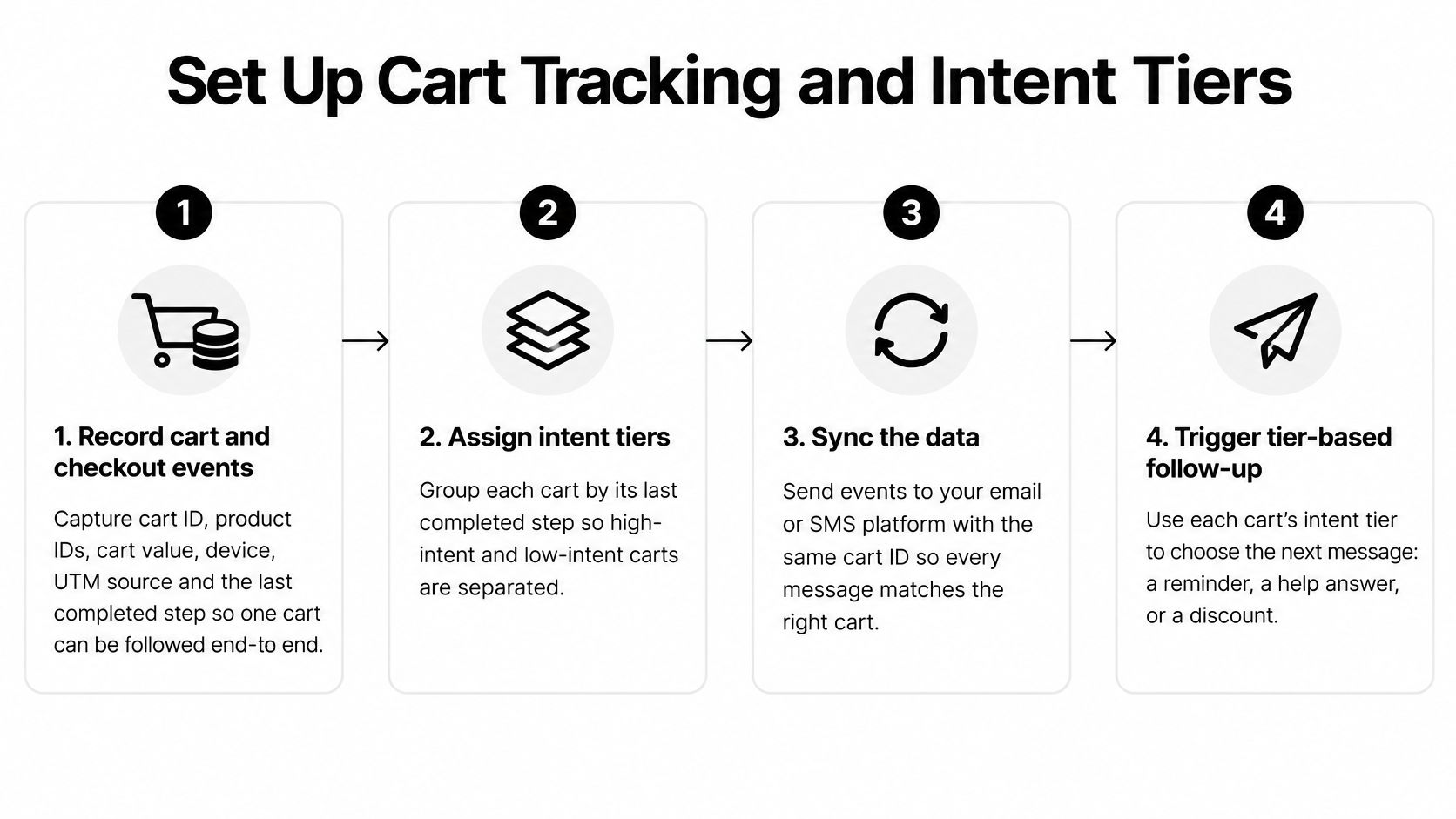
A store owner who sends the same recovery email to a shopper who failed a payment at checkout and to a shopper who dropped one item in their cart once is wasting both messages. Those two people have almost nothing in common. As Ecommerce Manager's breakdown of cart abandonment benchmarks points out, separating recoverable purchase intent from normal non-purchase browsing requires behavioral signals like repeat visits, product comparisons, search activity, cart edits, device type, traffic source, and time spent on site.
Setting up intent-based tracking takes five clear steps:
- Record cart and checkout events end to end. Capture the unique cart ID, product IDs, cart value, device, UTM source, and last completed checkout step on every session. Tying those fields to one cart ID lets you trace a single shopper from first add-to-cart to exit without guessing what changed along the way. When a shopper calls your support line, the exact cart they were building should be one click away, not a reconstruction from memory.
- Sort carts into three intent tiers. Separate high-intent shoppers who reached checkout or hit an error from medium-intent researchers who edited their carts and low-intent browsers who added one item from search. The practical payoff: your team stops treating a price-comparing researcher like a buyer who got blocked, and your automation stops sending urgent sales emails to casual visitors who were never close to ordering.
- Tag each tier with its likely friction cause. Attach operational tags such as shipping-region mismatch, account-creation gate, payment failure, or repeated form error based on the last recorded event. A tier alone tells you how hard to push; a tag tells you what to say. A payment failure tag routes the shopper to help with payment methods, while a shipping-region tag means your first move is a shipping quote or a delivery estimate, not a discount.
- Set a value threshold from your own store data. Pull your historical cart distribution and pick an internal cutoff, for example the top 10% of carts by dollar value, rather than copying a generic number from a blog post. High-ticket carts justify human outreach because one recovered order pays for hours of staff time. Small carts belong in lean automation because personal follow-up costs more than the margin they return.
- Hold back a random control group in every tier. Exclude a random slice of carts inside each tier from all recovery outreach so you can compare their natural completion rate against treated carts later. Without a clean holdout, you cannot tell whether an email caused an order or arrived right before a buyer returned on their own. Many high-intent shoppers finish with no contact at all, and counting their orders as recovery wins inflates every result you report.
<a id="match-each-intent-tier-to-its-first-response"></a>
Match Each Intent Tier to Its First Response
Use the matrix below to connect behavioral signals to your opening recovery move.
| Intent tier | Signals | First response |
|---|---|---|
| High intent | Reached checkout, hit a shipping or payment error, or cart above value threshold | Immediate help on the blocker, then draft order or invoice |
| Medium intent | Returned two or more times, compared products, or edited the cart | Saved-cart reminder with delivery and returns information |
| Low intent | One item added, no return, search-only session | No message, or one saved-cart reminder |
Notice what the matrix does for high-intent carts: the first response is assistance, not a coupon. A shopper blocked by a payment error needs the error fixed. Offering a discount to someone already willing to pay full price only cuts your margin on an order you were going to win anyway.
Real-time activity feeds and unique cart-ID views, like the ones built into Cart Whisper | Live View Pro, speed up steps one and two considerably. The feed shows visitors, cart changes, and shopping activity as they happen, and the Cart ID feature lets a store open a shopper's exact cart to help them finish the order. Distinguishing a frustrated buyer from a casual browser takes seconds when a support rep can see removed items and stalled steps live rather than inferring behavior from a day's-old export.
"Not only does it help me assist customers during checkout, but it actually helped me identify why so many carts were getting abandoned in the first place." (Wheelwiz, Shopify App Store)
That identification step is the whole point of tiering. Once your tracking shows which carts carry real purchase intent and which are browsing noise, every downstream decision, from who gets contacted to what the message says, becomes a mechanical read of the data instead of a guess.
<a id="fix-the-blocker-on-site-before-offering-a-discount"></a>
Fix the Blocker on Site Before Offering a Discount
Flashing a blanket coupon popup to every visitor who moves their cursor toward the browser tab is one of the costliest habits in ecommerce. Shoppers who already planned to buy grab the code and reduce your margin, while shoppers stuck on a real obstacle still leave because the popup never solved their problem.
The second classic mistake is hiding shipping costs until the final checkout screen. When a buyer enters their address and sees an unexpected delivery charge for the first time, no last-minute promo banner feels honest.
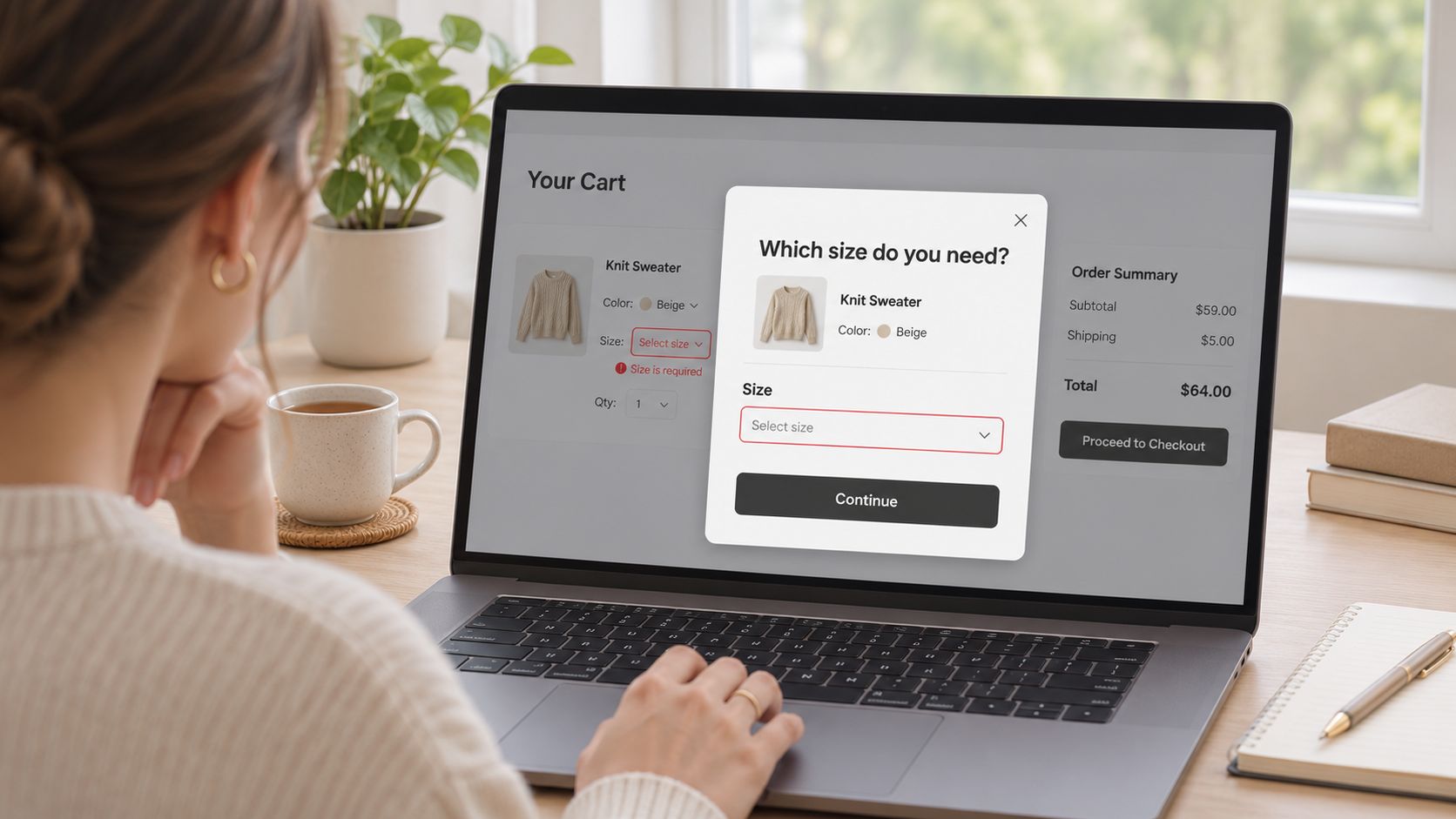
On-site recovery tools work best when they answer the exact question causing hesitation rather than bribing the visitor to ignore it.
<a id="use-exit-popups-and-cart-widgets-to-answer-friction"></a>
Use Exit Popups and Cart Widgets to Answer Friction
Place exit-intent popups exclusively on the cart or checkout page, and design them to resolve the missing detail: estimated total shipping, expected delivery dates, return rules, or accepted payment methods like Shop Pay and PayPal. Restrict those popups to carts above your internal value threshold or to returning visitors, and cap display frequency at once per session so the overlay never turns into another barrier.
Smart cart-page widgets prevent exits even earlier. Adding a live postal-code shipping estimator, a free-shipping progress bar, or a clear dispatch window right inside the cart drawer removes cost and speed surprises before the buyer clicks checkout. Getting your shipping tiers structured cleanly is half the battle, so review your approach to setting shipping rates on Shopify before adjusting your cart UI.
<a id="switch-to-assisted-checkout-for-high-value-and-b2b-carts"></a>
Switch to Assisted Checkout for High-Value and B2B Carts
Automated widgets can't solve complex order questions. For high-value retail carts and B2B orders, live human intervention outperforms any automated overlay. When a shopper hesitates on a large cart, a support or sales rep should pull up the exact cart contents, answer specific questions about bulk stock, freight timing, or payment terms, and convert the cart straight into a draft order or formal invoice.
Say a wholesale buyer loads a cart with seasonal inventory and stalls because they're unsure how the minimum order quantity affects tiered pricing. A quick chat or phone call explaining the next price break and emailing a ready-to-pay draft order closes the sale smoothly, whereas a generic discount code would neither answer their question nor survive their purchasing approval process.
<a id="protect-trust-when-you-contact-shoppers"></a>
Protect Trust When You Contact Shoppers
Aggressive recovery outreach carries a hidden cost that most marketing playbooks ignore: shoppers already worry about handing over their data. Many non-browsing abandoners hesitate to trust a store with payment details, and PrivacyTerms' 2026 ecommerce privacy statistics report highlights global findings linking shopper comfort with personalization directly to trust in a retailer's data practices, with meaningful variation by country.
Contacting a buyer too quickly, or quoting overly specific browsing behavior they didn't realize you tracked, feels invasive rather than helpful. If an outreach message makes a customer wonder how you knew they hovered over a size chart twice, you haven't recovered a cart; you've lost future repeat business.
Accountable personalization solves this trade-off. Apply five strict guardrails before sending behavior-triggered messages or launching live outreach:
- Disclose why you reached out: Tell the shopper plainly that they received a note because they saved a cart or requested checkout assistance on your store.
- Minimize displayed personal data: Show only the product details, cart link, and basic order facts the message needs, keeping full addresses and account metadata out of email previews.
- Collect clear consent first: Trigger behavior-based email or SMS follow-ups only for shoppers who opted in under the privacy rules of their region, rather than scraping form inputs from visitors who never consented.
- Enforce least-privilege staff access: Give support agents the exact cart contents and technical errors required to help, while hiding sensitive browsing histories or unrelated customer records they don't need.
- Include an obvious opt-out in every touch: Put a one-click unsubscribe or stop-help link in every automated message and assisted follow-up so hesitant shoppers stay in control.
<a id="handle-b2b-carts-like-commercial-quotes"></a>
Handle B2B Carts Like Commercial Quotes
Consumer coupons look clumsy in B2B and wholesale recovery. Business buyers rarely abandon because they're hunting for a flash sale; they pause because they need net terms, tax-exempt billing, freight quotes, or internal sign-off on a purchase order.
Say a facilities manager builds a pallet order on your store and exits on the payment screen because net-30 invoicing terms aren't listed clearly. Sending a transparent, cart-specific email from a named account rep confirming invoice eligibility and offering to issue a formal quote solves the actual procurement blocker. Sending a consumer promo code does nothing for their accounting department and erodes your wholesale pricing integrity.
Trust is measurable, not abstract. Track privacy complaints, opt-out rates, and repeat-purchase rates alongside assisted-sales conversion, split by market and account type, so you know whether outreach builds confidence or burns it.
<a id="run-a-timed-recovery-sequence-instead-of-one-reminder"></a>
Run a Timed Recovery Sequence Instead of One Reminder
Sending a single generic reminder leaves money on the table, yet blasting five messages in two days trains customers to unsubscribe. Set realistic expectations before building your flow. A summary of Klaviyo's 2024 report by Peak Digital on abandonment email benchmarks, covering more than 143,000 abandoned-cart flows triggered in 2023, found an average conversion rate of 3.33% and $3.65 in revenue per recipient. Separate Klaviyo abandoned cart benchmark material puts the average click rate for abandoned-cart flow emails at 6%.
Treat those numbers as starting baselines, not guaranteed lifts. Your average order value, product category, audience quality, geography, inbox deliverability, and attribution window will push your actual figures above or below the benchmark.
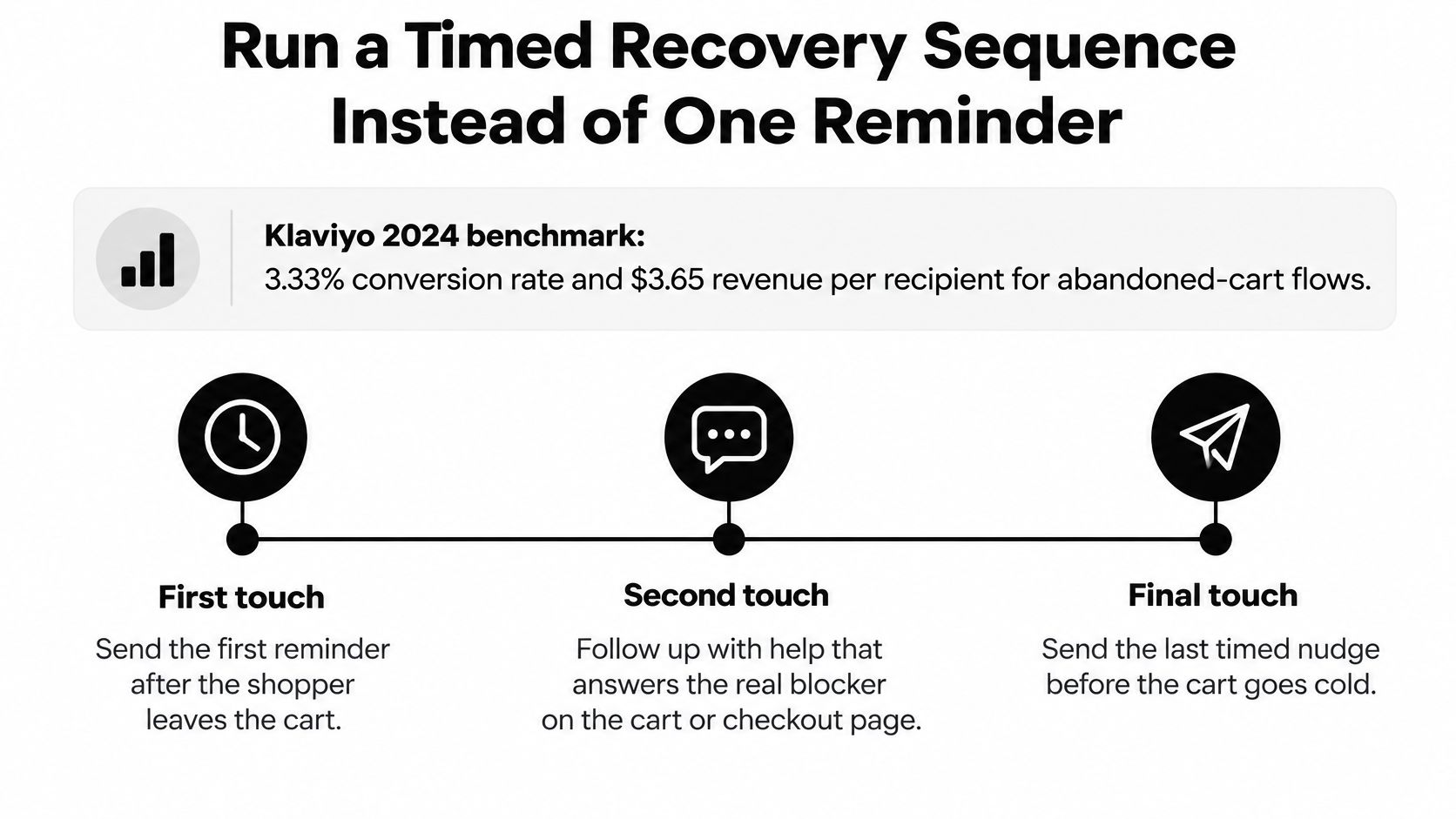
Start with a structured three-touch sequence and treat every timing value as an initial test parameter rather than a permanent rule.
| Message | Starting-point timing | Content | Incentive |
|---|---|---|---|
| 1. Cart reminder | About 1 hour after abandonment | Exact cart and answers to likely questions | None |
| 2. Trust and delivery | About 24 hours after abandonment | Delivery timing, returns and support access | None |
| 3. Time-limited offer | About 48 hours after abandonment, non-buyers only (test value) | Final price and reason to act now | Limited incentive, only if margin allows |
| Suppressed | When stock, price or cart contents change | Pause the sequence and review | None |
Each row exists for an operational reason. The first message waits roughly an hour so shoppers who got interrupted finish naturally without an unnecessary email, then restores their exact cart with a direct link and answers common product or sizing questions. The second message arrives around the 24-hour mark to address remaining hesitation around shipping speed, return policies, and how to reach a human support rep.
Reserve incentives strictly for the third message, sent around 48 hours out and filtered strictly to shoppers who haven't purchased yet. Only include a time-limited discount or free-shipping offer if your unit margin supports it. Offering a discount in message one teaches regular customers to abandon carts on purpose.
Never skip the suppression rule. Pause or cancel pending messages immediately if an item sells out, changes price, or gets removed from the cart. Sending a reminder for a product that now costs more or shows out of stock is the quickest way to destroy buyer trust.
<a id="technical-safeguards-and-optional-sms-rules"></a>
Technical Safeguards and Optional SMS Rules
Clean engineering keeps a good sequence from misfiring:
- Deduplicate triggers by cart ID: Ensure a shopper who refreshes checkout twice doesn't enter the same flow twice.
- Enforce strict frequency caps: Prevent repeat browsers from receiving multiple abandoned-cart sequences inside the same week.
- Honor marketing consent across channels: Sync unsubscribe states immediately between your store, email tool, and CRM.
- Run server-side order attribution: Reconcile completed orders on the server side so an order using a coupon code isn't double-counted across both an email flow and a paid ad platform.
Treat SMS as an optional add-on strictly for shoppers who explicitly opted into text alerts. Send at most one SMS reminder linking directly back to the exact cart, and suppress any follow-up text immediately if an email or organic visit already brought the shopper back to the site.
Don't launch all three touches and two channels on day one. Run one channel, one first-touch message, and one randomized holdout for four weeks to confirm clean lift before layering in a second email or an incentive.
<a id="measure-incremental-orders-and-start-this-week"></a>
Measure Incremental Orders and Start This Week
Email platforms love highlighting open rates because abandoned-cart reminders generate impressive inbox activity. In 2025, abandoned-cart emails averaged open rates of 40% to 45%, according to Sendtric's summary of recovery-email benchmarks.
High open rates are the wrong scoreboard. A shopper who already intended to buy your product after dinner might open your reminder email, click the link out of convenience, and finish checkout. Your email platform claims a recovered cart, even though the message produced zero incremental revenue.
Instead, evaluate every recovery flow on incremental orders and revenue per eligible recipient, comparing completed orders in the treated group directly against your untouched holdout inside each intent tier. If your reporting stack mixes definitions across teams, align everyone around standard business metrics definitions before reviewing test outcomes.
Reading the holdout test is straightforward. If high-intent carts that received your reminder convert at the exact same rate as the high-intent holdout group, your message only took credit for organic completions. Cut it, tighten the trigger, or fix the underlying on-site blocker instead.
<a id="your-first-week-rollout-plan"></a>
Your First-Week Rollout Plan
You don't need a quarter-long overhaul to put this system in place. Follow this five-day schedule starting Monday:
- Monday: Export 30 days of abandoned carts including cart ID, cart value, device, UTM source, and last completed checkout step.
- Tuesday: Tag each exported cart by its likely drop-off cause and assign your initial high, medium, and low intent thresholds.
- Wednesday: Build and activate only the first cart-reminder message for eligible high- and medium-intent shoppers, without a discount code.
- Thursday: Configure a 10% randomized holdout inside each tier as a starting test split and confirm server-side attribution counts coupon-assisted orders once.
- Friday: Record your baseline checkout completion rates by tier and put a calendar review on the books four weeks out.
Let the test run cleanly for all four weeks. Compare treated orders against the holdout before you add a second follow-up message or test a margin-checked discount.
If you run a Shopify store and want real-time visibility into which carts stall at checkout versus which shoppers are browsing, Cart Whisper | Live View Pro gives you a live activity feed, unique cart IDs, smart cart widgets, exit-intent popups, and draft-order conversion in one place. The Free plan costs nothing to install and includes 100 carts per month, and setup only requires a Shopify account (or logging into your existing one) and selecting your store. Install Cart Whisper | Live View Pro to start diagnosing cart friction before giving away margin.