
Personalized Shopping Experience: A Shopify Guide
You're watching shoppers reach your Shopify store, browse products, and build carts, but you still don't know why some leave. Think of a shop assistant who remembers you from your last visit and notices you hovering over the jackets. They wouldn't recite the entire catalogue. They'd offer the comparison or sizing advice you need right then.
Table of Contents
- What a Personalized Shopping Experience Really Means
- Why Shoppers Expect Personalization and What It Returns
- Using Customer Data Without Losing Shopper Trust
- Real-Time Signals Worth Tracking in Your Shopify Store
- Segments, Widgets and Cart Whisper Scenarios Checklist
- How to Run an Assisted Sales Workflow From Cart to Draft Order
- Measure One Personalization Test This Month
<a id="what-a-personalized-shopping-experience-really-means"></a>
What a Personalized Shopping Experience Really Means
A personalized shopping experience adapts what each shopper sees, is offered, and is helped with, based on live signals such as products viewed, searches, cart changes, referral source, and exit intent.
Say a shopper returns to a jacket they viewed earlier. A useful response might be a fit comparison, not a generic bestseller carousel. If they add the jacket to their cart and ask about delivery, the next interaction should address delivery, not keep recommending coats.
Think of personalization as connected layers:
- Recommendations decide what to show, such as compatible accessories or a relevant alternative.
- Messages determine when to speak, such as when a shopper needs shipping information.
- Assistance determines how to help, including bringing a person into the conversation.
Inserting a first name into an email doesn't accomplish any of these unless the message addresses something relevant. Recognition without usefulness is decoration.
Personalization is relevance at the moment of intent, not more content.
The expectation isn't new. In McKinsey's 2021 Next in Personalization study, based on a U.S. survey of 1,013 adults, 71% of consumers expected personalized interactions and 76% became frustrated when they were absent. That makes relevance a baseline expectation, not an extra flourish.
Shopify Live View is useful as a traffic map, but a map doesn't explain the story behind each visitor. Start with information your store already generates: products viewed, searches submitted, and cart changes. Each can suggest a helpful next step without requiring a detailed personal profile.
<a id="why-shoppers-expect-personalization-and-what-it-returns"></a>
Why Shoppers Expect Personalization and What It Returns
A shopper opens a wide lighting catalogue, filters once, and stalls. They are not waiting for a personal greeting. They want one useful response: a narrower set of options, or a person who can say whether the shortlisted product fits.
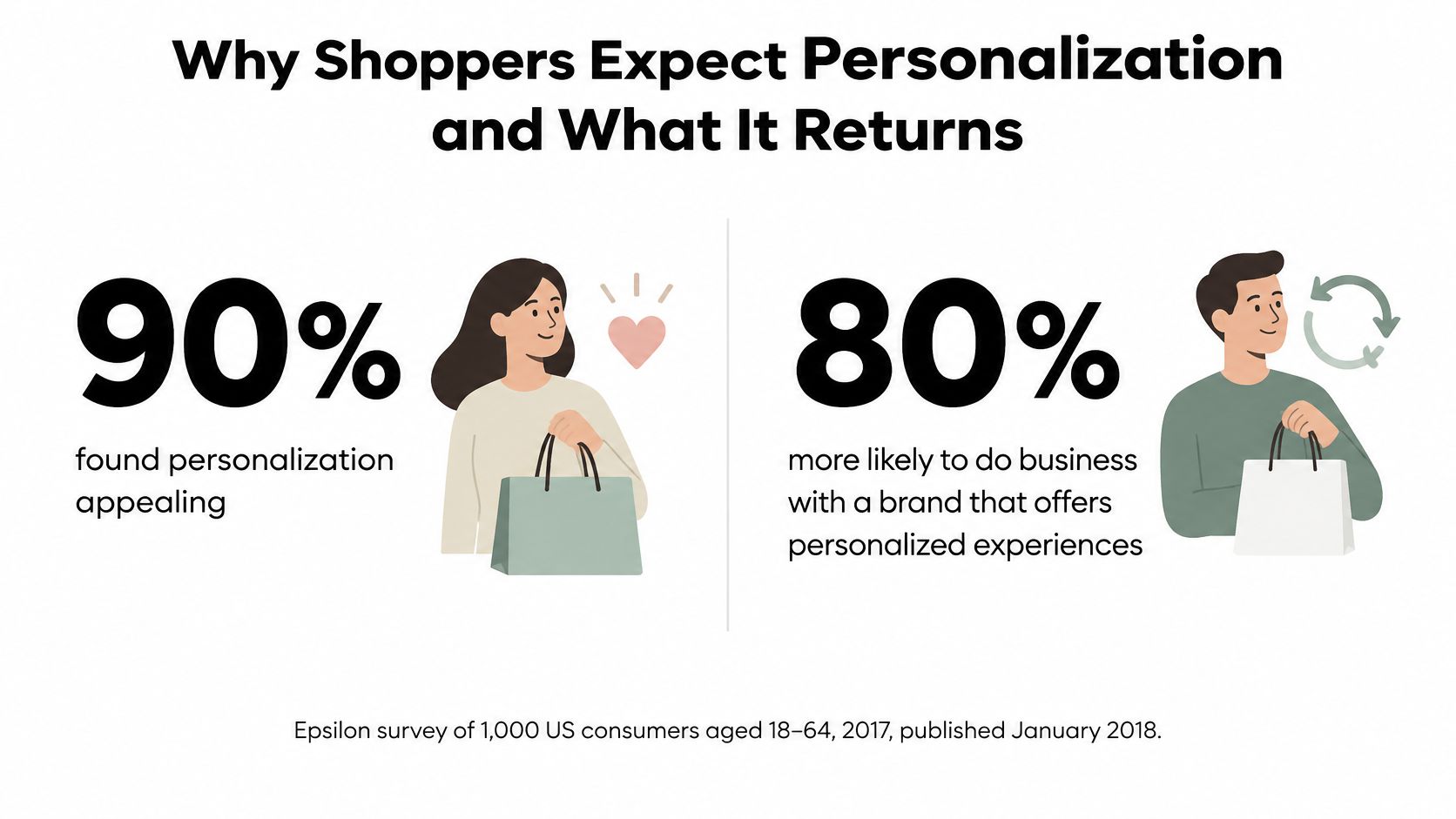
In Epsilon's 2017 survey of 1,000 U.S. consumers aged 18–64, published in January 2018, 90% found personalization appealing, and 80% said they were more likely to do business with a company offering personalized experiences. Those findings describe purchase appeal, not a guaranteed increase in completed orders.
<a id="match-the-return-to-your-catalogue"></a>
Match the return to your catalogue
Discovery matters when shoppers face a broad range. In Contentstack's 2025 survey, 67% of online shoppers said personalization had helped them discover relevant new products or services. A desk in progress can justify one compatible lamp. Rank that cart signal above a lone product view, which rarely justifies a new message.
Conversion and spending matter when customers already know the category but need confidence. Shoppers who prefer personalized brands have reported spending more with those brands. A pattern shoppers describe is not proof that a widget produces the same difference in your orders. Often the justified move is human assistance: a support reply on fit, then silence if the cart is still moving.
Repurchase deserves attention for replenishable products. A reminder for the item someone already uses can help them reorder. An indiscriminate promotion does not earn the interruption. Measure repeat orders directly rather than treating a spending gap as evidence of retention.
Budgeting rule: Use survey findings to choose a hypothesis, not to forecast your store's uplift.
Pick the return your catalogue can produce. Discovery fits a wide range, conversion a short list of high-consideration items, repurchase a consumable. Privacy belongs in the same ranking: if the signal does not change the recommendation or tell you a person should step in, leave the shopper alone.
<a id="using-customer-data-without-losing-shopper-trust"></a>
Using Customer Data Without Losing Shopper Trust
More data doesn't automatically produce better personalization. A merchant can know a great deal about someone and still interrupt them with an irrelevant offer.
The tension is visible in Qualtrics XM Institute's global consumer findings: 64% prefer companies that tailor experiences to their needs, yet 53% are extremely or very concerned about personal-data privacy. Wanting relevance isn't blanket permission to collect everything.
<a id="give-every-data-field-a-purpose"></a>
Give every data field a purpose
Build your first-party data strategy around decisions you can explain. A product view can support a related comparison. A shipping destination can support delivery guidance. Neither requires importing unrelated information about the shopper.
Use a practical data policy:
- Collect only what changes a decision. If a field doesn't affect the recommendation, message, or support response, leave it out.
- Explain the purpose nearby. Tell shoppers that their recent product views shape the suggestions they see.
- Provide a real control. Let them dismiss recommendations, change preferences, or turn optional personalization off.
- Restrict account information. Keep logged-in company details and negotiated terms available only to authorized staff.
An explanation should be specific enough to correct. For example, label a recommendation as based on recently viewed jackets and provide a way to clear that preference. Someone shopping for a gift shouldn't remain trapped in a profile that assumes those products reflect their own tastes.
<a id="make-less-personalization-a-testable-option"></a>
Make less personalization a testable option
Set retention periods around the support or analytical purpose, not indefinite storage by default. Use aggregated reporting for revenue analysis where individual histories aren't necessary, and review access permissions when staff responsibilities change.
Don't assume shoppers in every market welcome the same level of tailoring. Test clearer explanations and lighter recommendations by market, while following applicable consent requirements.
A useful hypothesis is that less aggressive, clearly explained personalization may perform as well as opaque targeting. Compare commercial outcomes alongside dismissals, opt-outs, and complaints. A purchase doesn't excuse a confusing data practice.
<a id="real-time-signals-worth-tracking-in-your-shopify-store"></a>
Real-Time Signals Worth Tracking in Your Shopify Store
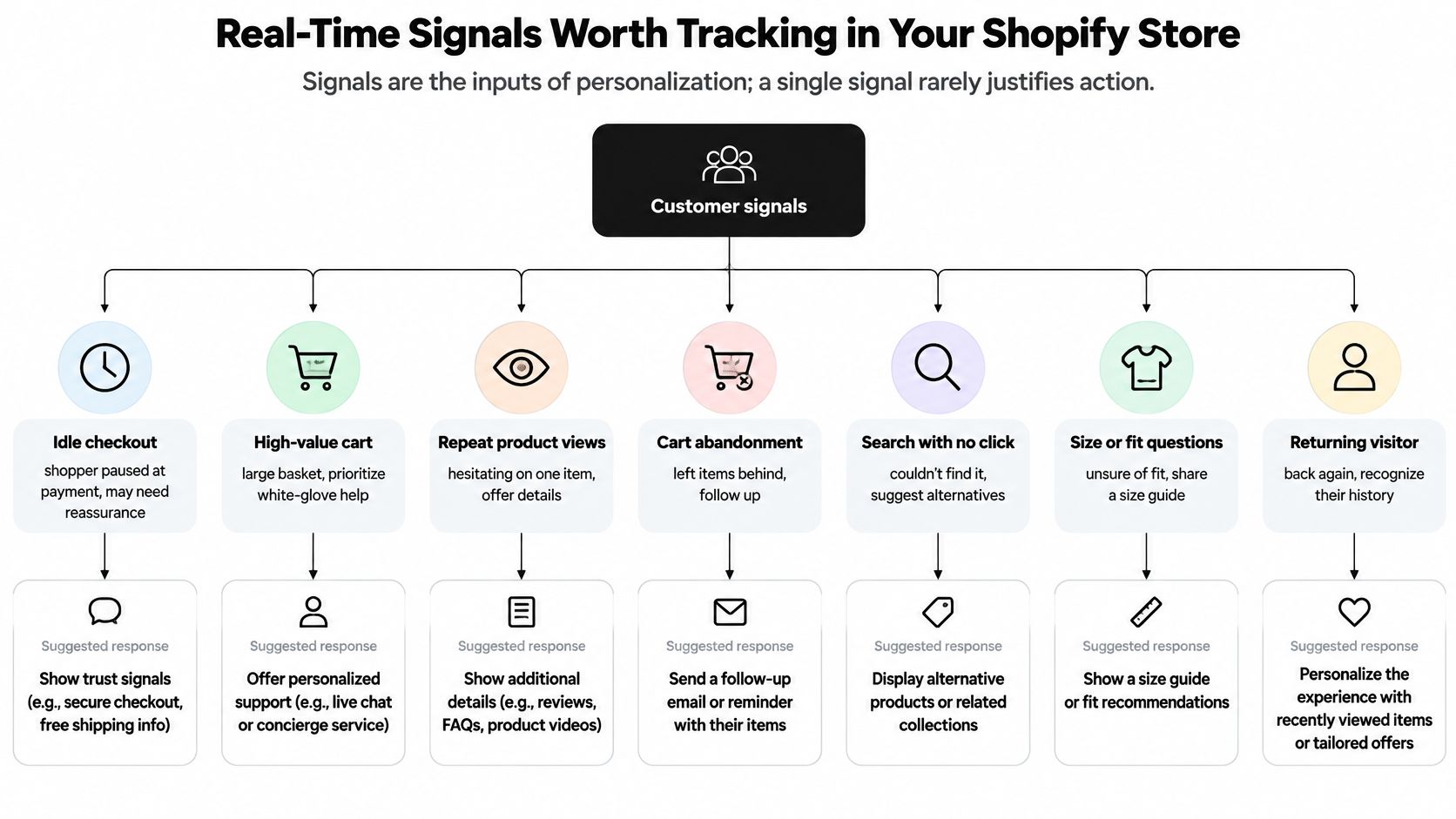
Signals are clues, not explanations. A removed item could reflect price concerns, a quantity correction, or a shopper choosing another colour. Match the strength of your response to the strength of the evidence.
A useful operating rule is to look for corroboration: a repeat product view followed by an add-to-cart action justifies more confidence than either event alone. An explicit question justifies a direct answer. Switching between browser tabs doesn't justify an intrusive intervention.
<a id="shopper-signals-and-the-response-each-one-justifies"></a>
Shopper signals and the response each one justifies
| Signal | What It Suggests | Response It Justifies |
|---|---|---|
| Product viewed repeatedly | Shopper may be comparing options | Show a comparison or sizing answer |
| Item added to cart | Purchase intent is forming | Surface delivery or stock details at the cart |
| Item removed from cart | Possible price or fit doubt | Ask a targeted question or show an alternative |
| Checkout entered, then idle | Possible friction or an unanswered question | Open the exact cart and offer assisted help |
| Exit intent on cart page | Shopper may leave without buying | Show an exit-intent offer or saved-cart link |
| Visit from a referral source | Campaign context, not proof of customer identity | Show the relevant campaign offer or product |
| Logged-in B2B account | Identified wholesale buyer with company context | Route to a sales representative and show authorized company details |
Our Cart Whisper | Live View Pro live activity feed shows visitors, viewed pages and products, cart additions and removals, devices, searches, and UTM sources as activity happens. Its Cart IDs connect assistance to the exact cart; targeted widgets, exit-intent popups, recovery emails, draft orders, B2B company details, and CSV exports support the response and subsequent analysis.
A real-time customer data approach is useful only when someone can act on the information. Unlike a broad traffic view, an event-level feed lets your team investigate the sequence around a stalled purchase, though it still won't reveal the shopper's thoughts.
<a id="prioritize-actionable-moments"></a>
Prioritize actionable moments
Choose signals using frequency, cart value, and response capacity. A frequent event isn't worth interrupting shoppers over if your team can't offer anything useful.
Say high-value checkouts regularly become idle during staffed hours. That's a promising assistance scenario because it occurs often enough to investigate, concerns meaningful orders, and allows a timely response. The same event overnight may call for a self-service answer rather than an invitation to unavailable live support.
<a id="segments-widgets-and-cart-whisper-scenarios-checklist"></a>
Segments, Widgets and Cart Whisper Scenarios Checklist
Start with segments your team can describe without a complicated scoring model: first-time visitors from a paid campaign, returning browsers who haven't added anything, and high-value carts that have remained idle beyond a defined interval. Set that interval from your store's observed buying patterns rather than assuming every pause means trouble.
A segment identifies the situation. A widget supplies the response. Don't build either without knowing what the other is supposed to accomplish.
<a id="choose-a-widget-that-answers-the-immediate-question"></a>
Choose a widget that answers the immediate question
For paid-campaign arrivals, keep the landing experience aligned with the advertised product or offer. Don't replace that context with an unrelated welcome promotion.
For returning browsers, offer comparison or size help. Someone revisiting jackets may need to understand the difference between cuts, insulation, or fit, not another grid of nearly identical products.
For idle carts, prioritize reassurance or access to assistance. A free-shipping progress bar fits a narrower situation: the cart is close to your store's threshold, and adding a suitable item could qualify it. Display the remaining gap accurately and avoid encouraging unnecessary purchases to fill the bar.
A shopper preparing to leave may benefit from a saved-cart option. Reserve a discount for a credible price-related scenario, rather than treating every exit as evidence that the price is wrong.
Use behavioral segmentation to distinguish these situations. Keep the logic understandable enough that a support representative can explain why a shopper received a particular message.
<a id="store-scenarios-strategies-and-cart-whisper-features"></a>
Store scenarios, strategies and Cart Whisper features
| Scenario | Trigger | Strategy | Cart Whisper Feature |
|---|---|---|---|
| Fashion store, returning visitor | For example, views three jackets without adding to cart | Segment returning browsers with a targeted help widget | Live activity feed showing products viewed |
| Homewares store, high-value cart | Cart becomes idle at checkout | Offer assisted chat, then permitted recovery follow-up | Cart ID to open the exact cart and recovery email with cart link |
| Wholesale buyer, logged in | Repeat reorder activity and quantity questions | Provide assisted sales with company context | B2B company details and draft order |
| Price-sensitive shopper | Removes an item after shipping appears, then signals exit | Test an exit-intent offer after checking the likely objection | Exit-intent popup with a volume- or location-based discount |
Treat the last scenario carefully. Removing an item after seeing shipping is a clue, not confirmation that a discount is necessary. A delivery explanation or alternative shipping option might address the concern without reducing product margin.
Wholesale stores should generally begin with the company-context scenario. Consumer stores can start with the cart-recovery situation that appears most often in their own traffic.
<a id="set-display-and-staffing-limits"></a>
Set display and staffing limits
- Keep the message focused. Show a single relevant intervention rather than stacking a promotion, chat invitation, and recommendation.
- Limit repetition. Set a session-level frequency cap for the test and respect dismissal.
- Make closing easy. The shopper should be able to continue without accepting help or sharing more information.
- Assign responsibility. Name the person who handles replies and the fallback when they're unavailable.
Before enabling a scenario, confirm its trigger, owner, and success measure. Randomly compare eligible sessions with and without the widget during a fixed pilot window. Check checkout completion and margin before expanding the audience, and don't declare success from a handful of enthusiastic replies.
<a id="how-to-run-an-assisted-sales-workflow-from-cart-to-draft-order"></a>
How to Run an Assisted Sales Workflow From Cart to Draft Order
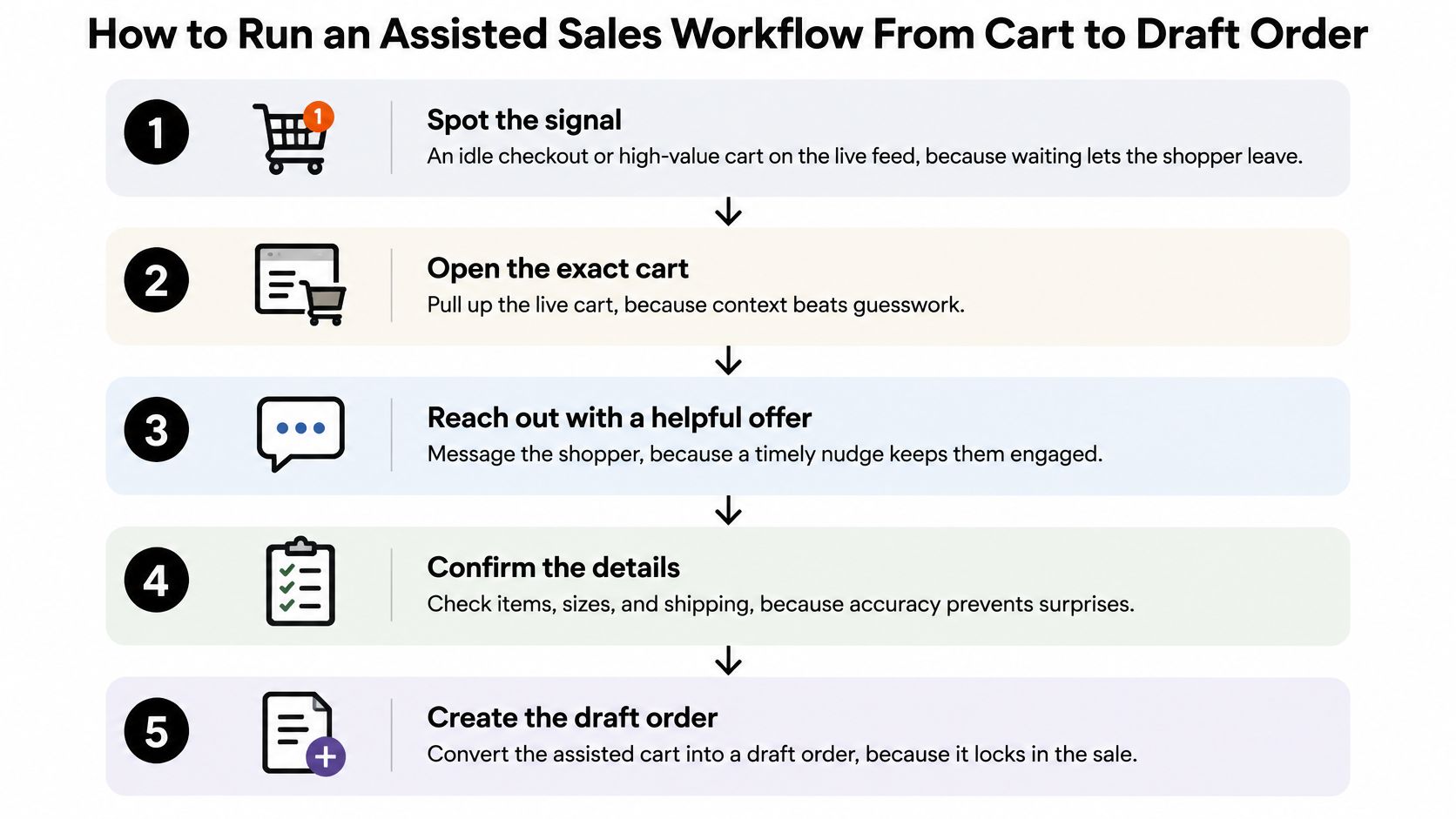
Assisted sales should remove work for the shopper, not create a second checkout process inside a conversation. Keep the shopper in control of product changes, quantities, and payment.
<a id="move-from-observation-to-confirmed-order"></a>
Move from observation to confirmed order
-
Spot a meaningful signal. Look for an idle checkout or high-value cart with supporting activity. Prioritize situations where a representative is available to respond while the shopper is still present.
-
Open the exact cart using its Cart ID. Check products, variants, and quantities before offering advice. This prevents a conversation based on an outdated basket or an assumed product choice.
-
Ask a focused question. Use the assistance widget or chat channel to ask whether the shopper needs help with delivery, sizing, quantity, or tax. Ask about the most plausible issue first rather than sending a questionnaire.
-
Resolve the question against the live cart. Confirm the relevant details and explain any proposed quantity change or alternative product. Get the shopper's agreement before making changes through your available store tools.
-
Create a draft order when appropriate. For an agreed quote or bulk purchase, convert the confirmed cart into a draft order and verify prices, shipping, taxes, and authorized company terms. Send the invoice or payment link for shopper approval and completion.
-
Follow up if the shopper leaves. Where permitted, send a recovery email containing the cart link and any appropriate optional discount. Make the message continue the unresolved conversation instead of restarting with a generic sales pitch.
<a id="remove-friction-before-adding-persuasion"></a>
Remove friction before adding persuasion
Baymard's checkout usability research reports that 17% of U.S. online shoppers had abandoned an order because checkout was too long or complicated. That finding supports a simple priority: resolve uncertainty and unnecessary effort before adding more personalization content.
For a wholesale order, a clear explanation of pack quantities may be more useful than recommendations. For a consumer order, a delivery answer or correctly prefilled field may be enough. Don't ask shoppers to repeat information your authorized representative can already see.
A draft order records an agreed purchase proposal. It isn't a completed sale until the shopper completes the required acceptance and payment steps.
Avoid two common slips. Slow replies miss the active buying moment, while premature discounts can train shoppers to pause for an offer. Staff the workflow properly and answer the actual question before reducing the price.
<a id="measure-one-personalization-test-this-month"></a>
Measure One Personalization Test This Month
| Metric | How to Measure | How to Read It |
|---|---|---|
| Checkout completion rate | Share of eligible sessions that finish checkout in each group | Higher in the test group over the same window |
| Time to purchase | Minutes from first product view to order | Shorter can indicate less friction; also check completion |
| Abandonment recovery rate | Share of flagged carts later ordered | Rises compared with control |
| Assisted-order rate | Completed orders originating from draft orders, divided by completed orders | Track separately from unassisted orders |
| Gross margin | Revenue less product costs on assisted and recovered orders, after discounts | Remains positive without sacrificing total margin |
Popup clicks aren't the outcome. A shopper can click a widget, become distracted, and leave without buying.
Randomly assign eligible sessions to intervention and control groups, keeping returning shoppers in a consistent group where feasible. Change a single signal-based response, run both groups concurrently across the same traffic sources, and choose the measurement window before starting.
<a id="keep-the-analysis-usable"></a>
Keep the analysis usable
Use the live activity feed to establish the baseline, Cart IDs for assisted sessions, and exit-intent popups only for the recovery scenario being tested. Export cart activity as CSV for Excel or Google Sheets, and join it to order records where identifiers permit.
Record staff time and discounts alongside orders. If traffic is too limited for a clear comparison, treat the result as inconclusive rather than assuming a small difference proves success.
Pick your highest-traffic eligible scenario, set a clear trigger, assign an owner, and schedule a review after four weeks. Decide whether to keep, revise, or stop the intervention based on completed purchases and margin.
Cart Whisper | Live View Pro offers real-time shopper activity, exact-cart assistance, and recovery tools to help your team respond to buying friction with relevant support. Visit Cart Whisper | Live View Pro to start with the cart scenario you want to understand and improve.