Real Time Data Services: A Practical Guide for 2026
Your store has visitors, shoppers are changing their carts, and support is answering questions. But the report on your screen describes yesterday. By the time someone spots a checkout problem, the shopper who needed help may already have left.
Real time data services close that gap by delivering events while someone can still act on them. The important question isn't how fast a dashboard refreshes. It's whether your team receives a trustworthy signal before the opportunity to help disappears.
Table of Contents
- What Real Time Data Services Are and How They Differ from Batch
- Architecture and Technologies Behind a Real-Time Stack
- Business Use Cases and the Gains Teams Measure
- KPIs That Prove Real-Time Value
- How to Build a Real-Time Pipeline Step by Step
- Reliability, Privacy and Challenges to Plan For
- Confirm Your Requirements and Choose a Provider
<a id="what-real-time-data-services-are-and-how-they-differ-from-batch"></a>
What Real Time Data Services Are and How They Differ from Batch
A nightly sales report is like counting the till after closing. A live feed of visitor and cart events is closer to watching the shop floor, with the important qualification that online visibility needs clear privacy boundaries.
Real time data services continuously deliver business events to people and software within a useful response window. Those events might describe storefront visits, cart changes, orders, payment outcomes, or sensor readings. A service receives them, processes them, and makes them available for a decision.
<a id="real-time-describes-a-deadline-not-a-universal-speed"></a>
Real time describes a deadline, not a universal speed
An inventory planner and a payment-risk system don't have the same deadline. The planner may accept periodic updates before adjusting availability, while a payment decision must arrive before the transaction proceeds.
This ambiguity isn't new. In a survey of big-data professionals, 35% defined real time as processing information within 30 minutes, according to SiliconANGLE's coverage of streaming analytics adoption. That doesn't make the definition suitable for checkout assistance. It shows why buyers need a business deadline rather than a feature label.
Batch, near-real-time and real-time processing compared
| Approach | Typical latency | How data moves | Ecommerce example |
|---|---|---|---|
| Batch processing | Hours to one day in a scheduled reporting design | Scheduled job runs over stored data | Nightly sales report |
| Near-real-time | Minutes in a micro-batch design | Small batches move at short intervals | Periodic inventory availability refresh |
| Real-time streaming | Milliseconds to seconds as a design objective | Each event processed as it arrives | Live cart activity feed |
These are illustrative architectural patterns, not performance guarantees. A streaming pipeline can still fall behind if its processor, database, or browser can't keep up.
<a id="choose-the-simplest-approach-that-meets-the-deadline"></a>
Choose the simplest approach that meets the deadline
Batch processing remains useful for reconciliation, historical analysis, and merchandising reports. Streaming adds continuously running infrastructure, recovery logic, and operational responsibility. It earns that complexity when someone can change an outcome before the next scheduled update.
Decision test: Would the decision look different an hour from now? Could the delay lose a sale or create an avoidable support request?
If either answer is yes, investigate streaming. Then compare its full cost with the value of acting sooner, rather than assuming every dataset needs continuous delivery.
<a id="architecture-and-technologies-behind-a-real-time-stack"></a>
Architecture and Technologies Behind a Real-Time Stack
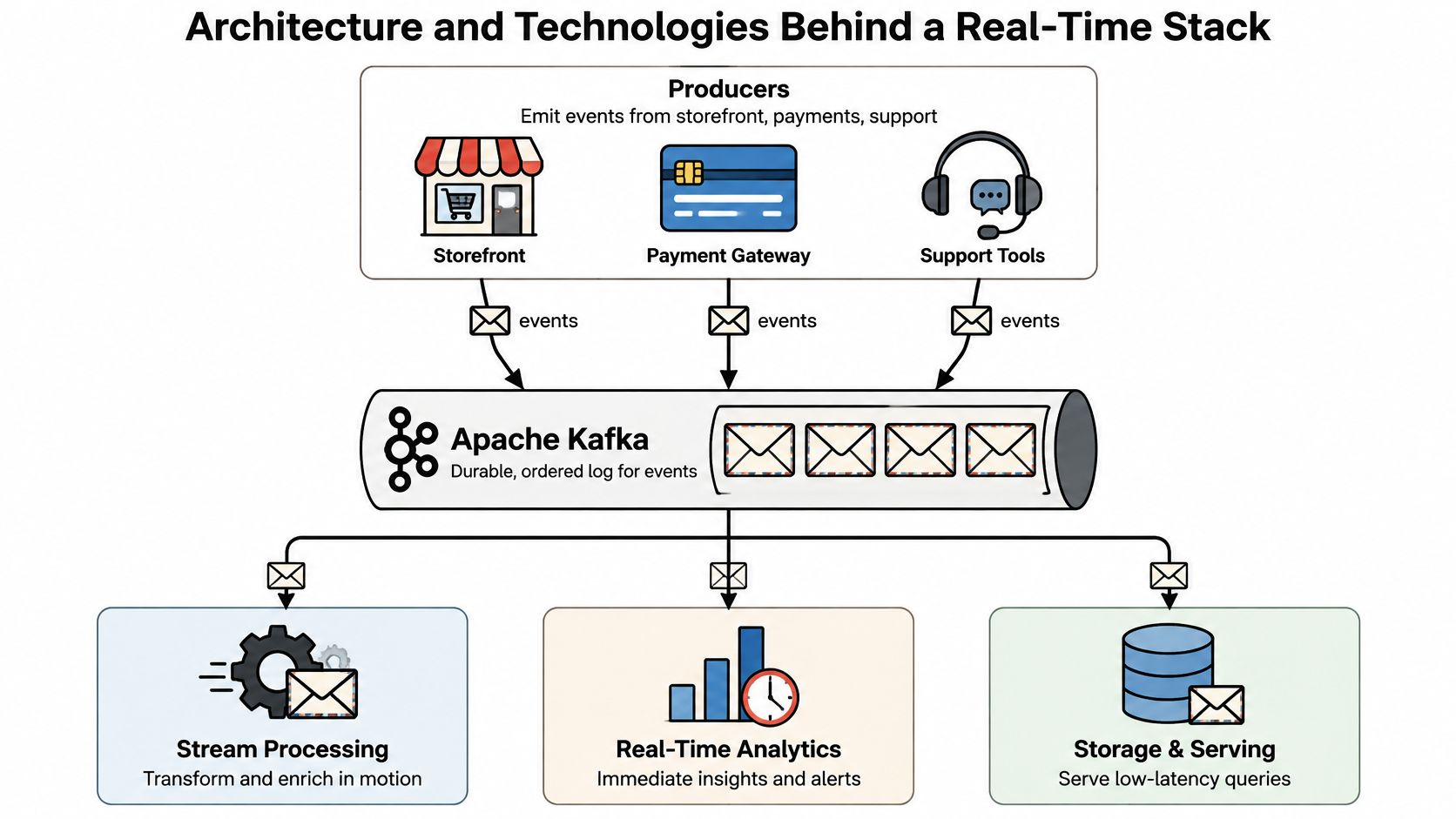
Think of the stack as a postal system. Producers write the letters, a broker receives and retains them, processors interpret their contents, and a serving layer makes the results available to the right recipient.
A storefront might emit an item-added event. A payment gateway emits a payment outcome, while a support tool records an assistance request. Give each event enough context to connect it to the correct store and business object without loading it with unnecessary customer details.
<a id="separate-transport-from-interpretation"></a>
Separate transport from interpretation
A durable event broker, such as Apache Kafka, Amazon Kinesis, or Redpanda, lets different consumers read retained events at their own pace. Ordering must be designed around a meaningful key, such as a cart, rather than assumed across every event in the business.
A stream processor such as Apache Flink or Kafka Streams filters, joins, and aggregates those events. For example, it can combine cart mutations with product information to maintain a current cart total. Redis can serve current application state, while ClickHouse can support analytical queries across activity.
Stack layers and example technologies
| Layer | Role | Example technologies |
|---|---|---|
| Source | Emits business events | Storefront, payment gateway, support tools |
| Broker | Retains ordered event streams for several consumers | Apache Kafka, Amazon Kinesis, Redpanda |
| Processor | Filters, joins and aggregates arriving events | Apache Flink, Kafka Streams |
| Store | Keeps state or analytical records available for queries | Redis, ClickHouse |
| Delivery channel | Pushes updates to browser dashboards | Server-Sent Events with EventSource |
| Access control | Limits which tenant sees which events | Per-tenant authorization, connection limits |
<a id="match-the-last-hop-to-the-interaction"></a>
Match the last hop to the interaction
For a dashboard receiving updates, Server-Sent Events, or SSE, offer a one-way push channel over persistent HTTP. The HTML Living Standard's Server-Sent Events specification defines the browser's EventSource interface, the text/event-stream format, automatic reconnection, and the server-controlled retry field.
That makes SSE suitable for incoming cart updates or support alerts. It doesn't carry dashboard actions back to the server. Sending a message or creating a draft order should use an ordinary authenticated HTTPS request or a separate bidirectional protocol.
A real-time customer data platform adds another design concern: connecting events to usable customer context. Don't confuse that responsibility with transporting messages. A design review should name the source, transport, processor, store, delivery channel, and access control, even when a managed service combines several of them.
<a id="business-use-cases-and-the-gains-teams-measure"></a>
Business Use Cases and the Gains Teams Measure
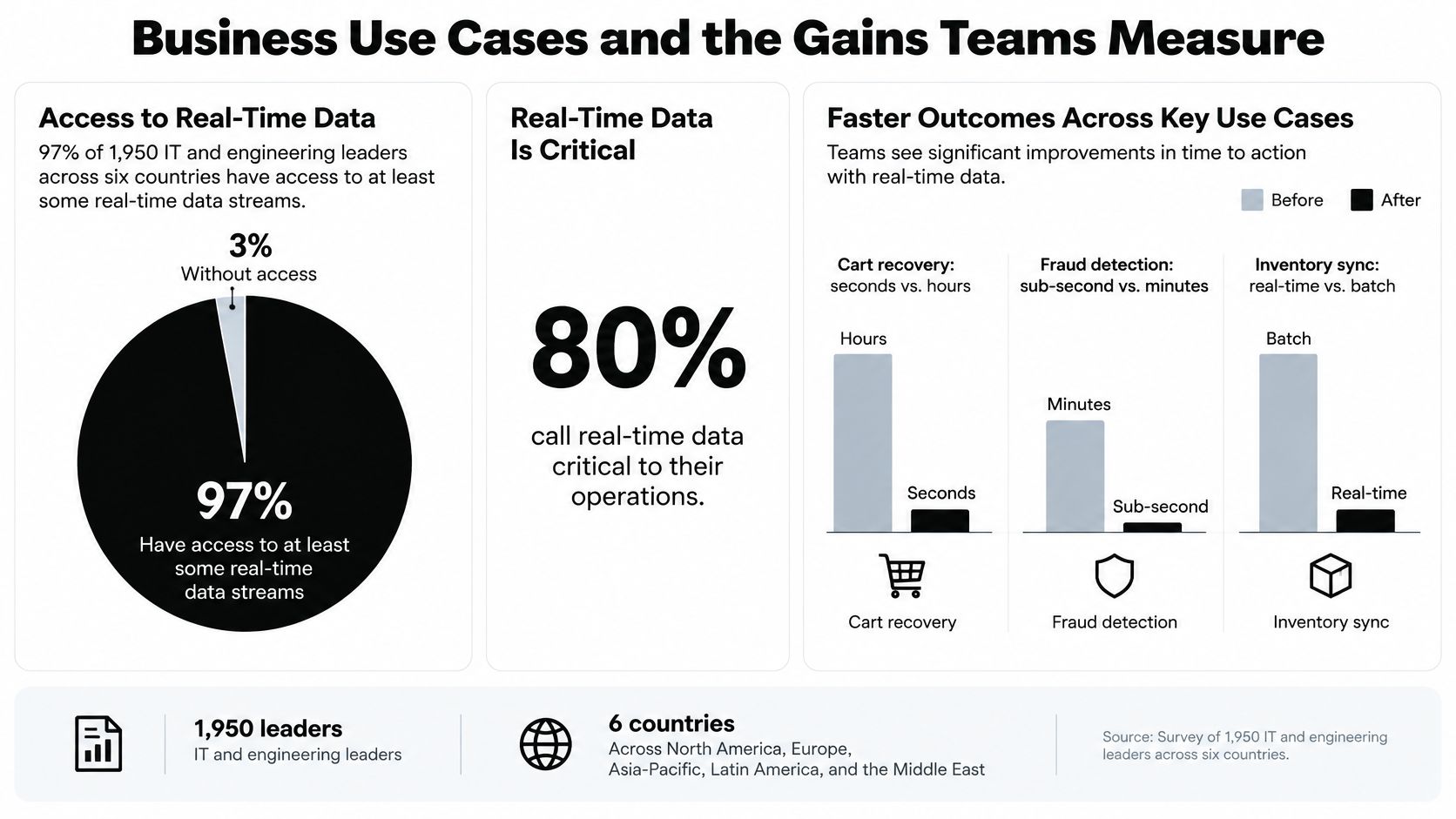
In a 2022 survey of 1,950 IT and engineering leaders across six countries, 97% reported access to at least some real-time streams, and 80% said real-time data was very or extremely important for richer customer experiences, according to Confluent's Data in Motion report findings. That's evidence of broad relevance, not proof that installing a live dashboard causes revenue growth.
For merchants, the useful connection is more concrete: an event arrives, someone recognizes a problem, and they take an appropriate action before the shopper leaves.
<a id="turn-activity-into-a-service-decision"></a>
Turn activity into a service decision
Say a shopper repeatedly changes quantities and returns to the shipping page. That pattern may justify making help available, but it doesn't prove frustration or justify an automatic discount. The operator needs context and a restrained response.
At Cart Whisper | Live View Pro, our live activity feed shows visitors, cart changes, and shopping activity as it happens. It includes page visits, searches, and UTM sources, helping teams understand both the current journey and the traffic source.
The business decision changes with the event:
- Browsing and search activity: Help a shopper find a suitable product when they ask, rather than treating every search as buying intent.
- Cart additions and removals: Use the current selection to answer compatibility, quantity, or delivery questions accurately.
- Checkout hesitation: Offer relevant assistance without claiming to know why the shopper paused.
- Campaign traffic: Watch incoming journeys for shared friction before deciding whether to change a landing page or campaign.
<a id="apply-the-same-principle-beyond-retail-checkout"></a>
Apply the same principle beyond retail checkout
A wholesale buyer may need a quote, account-specific clarification, or help preparing an order. Company context and a saved cart can make that conversation easier than reconstructing the purchase from an email.
Operational teams have different response windows. Inventory alerts should reach the person who can adjust availability before another customer buys unavailable stock. A delivery exception should reach support before an uninformed reply. Payment anomalies need review before the fulfillment action they are intended to prevent.
A live event has operational value only when someone owns the next action.
The expected benefits are faster response, fewer avoidable abandoned sessions, less manual reporting, and better staffing decisions. Treat each as a hypothesis to measure. A busy feed without an owner, escalation path, or intervention policy is just another screen employees must watch.
<a id="kpis-that-prove-real-time-value"></a>
KPIs That Prove Real-Time Value
A fast feed isn't necessarily a useful feed. In Adobe's retail digital trends report, 41% of retailers said data-management limitations prevent real-time personalization, while 35% said they cause inconsistent cross-channel experiences. Reliability and context belong in the scorecard alongside speed.
Organize measurement around freshness, completeness, identity confidence, and business outcomes. Freshness asks whether the information arrived in time. Identity confidence asks whether the event is safely associated with the right cart or account, without guessing that an anonymous visitor is a known customer.
<a id="measure-the-service-and-the-decision-separately"></a>
Measure the service and the decision separately
KPIs for real-time data services
| KPI | What it measures | Example target or calculation |
|---|---|---|
| Ingest-to-dashboard latency (p95) | Event creation to screen update at the 95th percentile | Set a target shorter than the assistance window |
| Reconnect recovery time | Time to resume usable delivery after a dropped connection | Restore current state before staff act |
| Event completeness | Share of state-changing events delivered and applied | Applied unique state changes divided by expected source state changes |
| Duplicate rate after reconnects | Share of events applied more than once | No duplicate application once idempotent handling is working |
| Intervention-to-order conversion | Share of assisted sessions ending in an order | Compare with an eligible holdout group |
| Incremental recovered revenue | Recovered cart value above baseline | Treated sessions × recovery-rate difference × average cart value |
Report p50, p95, and p99 latency separately from reconnect recovery. An average can conceal slow experiences during traffic spikes, while a connected dashboard can still be behind the source.
For cart assistance, accurate state usually deserves priority over shaving an imperceptible delay. An operator shouldn't recommend adding a product the shopper has already removed.
<a id="calculate-incremental-value-rather-than-claiming-every-recovery"></a>
Calculate incremental value rather than claiming every recovery
Assign eligible sessions to an intervention group and a comparable holdout that doesn't receive the live intervention. Use the same eligibility criteria and order-attribution window for both.
Incremental recovered revenue = eligible treated sessions × (treated recovery rate − holdout recovery rate) × average cart value.
The session count matters. A rate difference multiplied only by cart value estimates incremental value per eligible treated session, not total recovered revenue. Keep discounts and service costs separate if you're evaluating contribution rather than gross revenue.
For support efficiency, compare first-response time and resolution effort before and after launch, accounting for changes in staffing and case mix. Use a consistent key performance indicator framework, set targets before launch, and review them regularly. Don't redefine success after seeing the results.
<a id="how-to-build-a-real-time-pipeline-step-by-step"></a>
How to Build a Real-Time Pipeline Step by Step
Start with a narrow workflow that someone can operate. A cart-assistance pipeline is easier to validate when support can explain exactly what information they need and what they will do with it.
<a id="build-the-event-contract-before-the-dashboard"></a>
Build the event contract before the dashboard
-
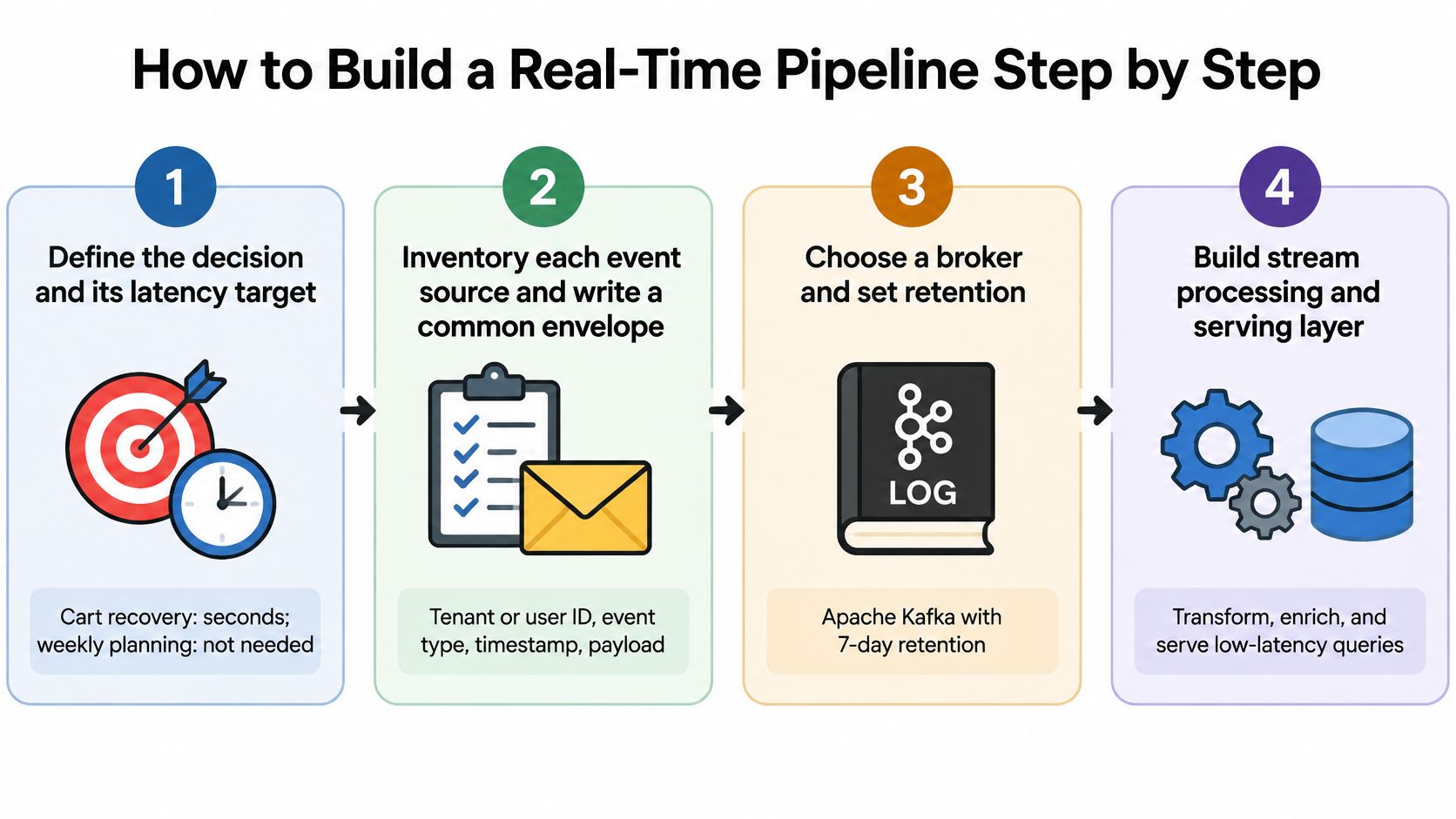
Define the decision and deadline. Write the action in plain language, such as helping a shopper complete an active cart. Set the delivery deadline from that workflow, not from a vendor's fastest demonstration.
-
Inventory the sources and write a common event envelope containing store ID, cart ID, stable event ID, sequence number, event type, occurred-at timestamp, and schema version. Keep occurrence time separate from receipt time so delayed transmission doesn't look like fresh shopping activity.
-
Choose transport for each leg. A broker helps when multiple backend services need independent consumption and replay; SSE serves the browser-facing delivery leg. They're complementary components, not interchangeable alternatives.
-
Make consumers idempotent, meaning replaying an event doesn't apply its business effect again. Store processed IDs or a safe per-stream checkpoint, and coordinate that checkpoint with state updates so a crash can't leave them inconsistent.
The W3C EventSource recommendation specifies reconnection after interrupted streams. Build and test recovery deliberately rather than assuming the browser's reconnect behavior guarantees complete application state.
<a id="test-recovery-before-expanding-access"></a>
Test recovery before expanding access
-
Implement replay with ordered delivery IDs. Retain a replay window and use the reconnecting client's
Last-Event-IDto resume delivery. If the requested history has expired, return a fresh authoritative snapshot instead of continuing with an incomplete cart. -
Control backpressure by combining repetitive presence or browsing updates when intermediate observations aren't needed. Preserve item-added, item-removed, checkout-started, and cart-converted events because collapsing business state changes can produce incorrect totals or actions.
-
Pilot with a limited store or dataset. Record latency distributions, completeness, reconnect behavior, and operator response, then test dropped connections, repeated messages, and out-of-order arrival. A clean demonstration under normal traffic isn't a recovery test.
-
Roll out with tenant authorization, connection limits, heartbeat comments, and an owner for operational alerts. Test permissions using separate stores so a correctly delivered event can never appear in the wrong merchant's dashboard.
A practical acceptance test connects the event to assistance. Our Cart ID feature lets a store open the customer's exact cart to help finish an order. Validate that the operator reaches the intended cart and sees its current contents, rather than merely confirming that an event appeared on screen.
<a id="reliability-privacy-and-challenges-to-plan-for"></a>
Reliability, Privacy and Challenges to Plan For
Disconnects, duplicates, and stalled screens are normal operating conditions. The dangerous failure isn't always an obvious outage. It can be a plausible-looking dashboard that encourages an employee to act on incorrect information.
Make failure visible and give operators a safe fallback. If cart state can't be verified, show that uncertainty and refresh from the authoritative source before an irreversible action.
Real-time failure modes and how to prevent them
| Failure | What it looks like | Mitigation |
|---|---|---|
| Duplicate events after reconnect | Same cart update counted twice | Stable event IDs and an idempotent consumer that ignores repeats |
| Gaps after a dropped connection | A cart shows an item that was already removed | Sequence numbers, gap detection and Last-Event-ID replay |
| Stale dashboard | Screen looks live but has frozen | Heartbeat comments and an alert when the connection goes quiet |
| Overloaded browser | Rendering lags during traffic spikes | Coalesce presence and browsing events, keep state changes intact |
| Excess personal data | Staff see more customer detail than the task needs | Role-based access, data minimization and retention limits |
<a id="more-visibility-isnt-automatically-better"></a>
More visibility isn't automatically better
Customers can want relevant help and still object to extensive monitoring. In Attentive's consumer personalization study, nearly two-thirds of consumers took steps to protect their privacy, while 71% wanted brands to learn from their shopping behavior over time. Personalization and control aren't opposites.
A useful staff view doesn't need every piece of information you can collect. Show the active cart and relevant service context; restrict unrelated profile details. For anonymous visitors, prefer session-level information rather than attempting to infer a named identity.
Privacy boundary: Collect and display what the assistance workflow needs, not everything the tracking system can capture.
<a id="make-access-and-retention-explicit"></a>
Make access and retention explicit
Assign permissions by task. A support agent resolving a cart question may need different information from an analyst evaluating campaign traffic, and neither should automatically receive unrestricted exports.
Define retention separately for transient presence, cart history, operational logs, and exported files. Deleting records from the live application won't remove copies employees have downloaded. Include exports and downstream systems in your data security and privacy compliance process.
Explain to shoppers what activity is monitored, why it's used, and how their choices affect collection. Configure tracking and interventions to respect applicable consent requirements rather than assuming a live dashboard creates permission.
Helpful assistance answers the customer's problem. An unsolicited message describing their browsing in excessive detail can feel intrusive and undermine the sale the team hoped to support.
<a id="confirm-your-requirements-and-choose-a-provider"></a>
Confirm Your Requirements and Choose a Provider
Provider selection gets easier once you treat real time as a response window. The question that matters is which decision the data must support and how quickly a person has to act on it. A support agent answering a cart question needs the signal while the shopper is still on site; a weekly performance review can wait for slower delivery. Score your shortlist on the decision deadline, expected cart and event volume, required cart detail, B2B account context, marketing integrations, engineering availability, and cost predictability.
Separate monthly volume from peak load. A bridge is sized for rush hour, and a real-time system works the same way: a store with modest monthly totals can still hit sharp bursts when a campaign launches. For a custom system those bursts drive capacity planning. For an app, confirm how usage is counted and what happens at the plan boundary.
<a id="compare-ownership-as-well-as-capability"></a>
Compare ownership as well as capability
A custom build gives you control over schemas, retention, integrations, and operational behavior. It also hands your team security updates, recovery testing, monitoring, and on-call support.
An app-based route trades some architectural control for less implementation work. Built-in visibility may be sufficient when the operator only needs a high-level view and cart-level assistance is out of scope.
Real-time options compared by fit and limits
| Option | Best fit | Volume, history and trade-offs |
|---|---|---|
| Shopify Live View | High-level activity monitoring | Check the detail level supports the assistance workflow you plan to run |
| Cart Whisper Free plan | Testing cart-level visibility on a small store | 100 carts per month |
| Cart Whisper Business plan | Growing stores running cart recovery | 500 carts per month, 14-day cart history |
| Cart Whisper Growth plan | Teams adding analytics, Slack alerts and longer history | 60-day cart history, up to 3 alert rules with follow-ups |
| Cart Whisper Enterprise plan | High-volume and B2B-heavy brands | 7,000 carts in the base price, $6 per additional 500 carts, 90-day history |
| Custom real-time build | Teams needing full stack control | Capacity you provision and operate yourself |
The Free plan from Cart Whisper | Live View Pro costs nothing to install and includes a live activity feed, cart-to-draft-order conversion, smart cart widgets, and exit-intent popups. Business adds high-value cart email alerts and a 7-day free trial. Enterprise costs $99 per month, includes Klaviyo integration and priority support, and offers a 7-day trial as well. All charges are billed in USD, with recurring and usage-based charges billed every 30 days.
<a id="run-a-decision-focused-evaluation"></a>
Run a decision-focused evaluation
Give the people doing the work a role in the trial. Support should test whether they can open the exact cart a customer is asking about, analysts should test whether exports answer their questions, and whoever owns security should review access and retention.
For B2B assistance, Cart Whisper shows company names and logged-in customers. If marketing handoffs matter, the Enterprise plan includes Klaviyo integration. These capabilities pay off only when someone owns the corresponding account or recovery process.
- Count usage. Establish monthly carts, event sources, peak periods, and the staff who need access.
- Pick the KPIs. Choose the service and business KPIs, including a baseline and a holdout group for comparison.
- Test a suitable route. Install the Free plan or use a trial whose capacity matches the evaluation, and record operator actions alongside outcomes.
- Decide from evidence. Expand, change the workflow, or stop based on the targets agreed before launch.
Keep the final question practical: did reliable information reach the right person early enough to improve the decision? If the answer is no, a faster feed alone will not fix the problem.
Cart Whisper | Live View Pro offers live shopper and cart visibility, exact-cart assistance through Cart IDs, and cart-to-draft-order workflows. Visit Cart Whisper | Live View Pro to choose a suitable plan and test whether acting during the shopper's session improves your recovery and support outcomes.