Real Time Data Validation: Approaches and Pitfalls
Your flash sale goes live at noon, and the live store dashboard lights up with cart additions. Five minutes later, your support lead opens a high-value cart to assist a shopper, only to find an empty session, a missing product SKU, and three identical add-to-cart events stamped two milliseconds apart. The pipeline delivered those events in under a second, yet nobody on the floor can trust what's on the screen.
Teams run into this exact failure because they treat streaming infrastructure as a pure speed race. Demand for live data has surged: in 2024, 86% of IT leaders prioritized investments in data streaming, according to Confluent's 2024 Data Streaming Report. Spending on quality controls has grown alongside it, with the global streaming data quality market valued at USD 1.92 billion in 2024, per DataIntelo's 2025 market research report.
Fast delivery alone doesn't make an event trustworthy. Effective real time data validation has to verify event meaning, shopper identity, and user consent alongside raw speed. A millisecond check can't tell a real buyer from a delayed duplicate or a scraping bot, and a syntactically clean payload still can't be enriched or attributed when browser identifiers and consent flags are missing.
Table of Contents
- What Real Time Data Validation Means and Why It Matters
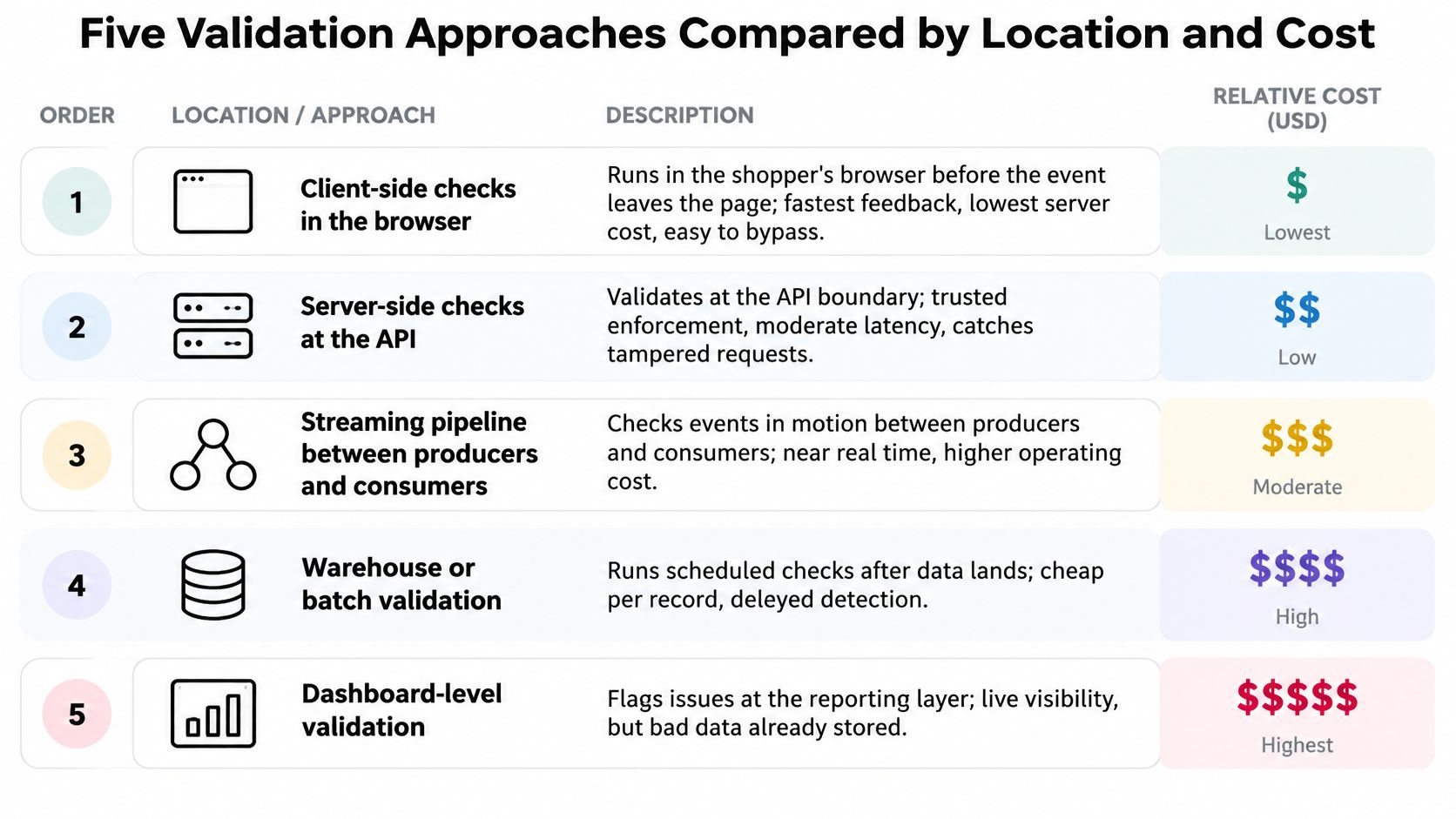
- Five Validation Approaches Compared by Location and Cost
- Deployment Patterns and the Speed Versus Blocking Trade-off
- How to Build a Validation Contract for Live Cart Events
- Metrics That Show Whether Validation Is Working
- Pitfalls, Edge Cases and Decisions for Suspect Events
- Validating Identity, Consent and Attribution Gaps
- Choose Your Validation Stack and Start With One Check
<a id="what-real-time-data-validation-means-and-why-it-matters"></a>
What Real Time Data Validation Means and Why It Matters
Think about the difference between a sensor on a factory conveyor belt and an annual warehouse audit. The conveyor belt sensor measures every box as it passes and diverts a cracked bottle before it ever gets sealed into a shipping carton. A warehouse audit catches the defect weeks later, after broken glass has already ruined three pallets and angered your customers.
Real time data validation is the conveyor belt for your event stream. It continuously checks incoming or changing records against explicit quality rules as they arrive, rather than cleaning up mistakes after bad rows have already landed in storage and fed your dashboards.
For decades, data teams relied on static database checks that ran overnight in batch jobs. That rhythm worked when executives only checked yesterday's sales report at 9 a.m. Once ecommerce teams started running live activity feeds, automated cart alerts, and real-time personalization, waiting until midnight meant making live operational decisions on corrupted numbers.
<a id="the-four-quality-dimensions-of-a-live-stream"></a>
The Four Quality Dimensions of a Live Stream
A 2024 academic study published in the ACM Digital Library on streaming-data quality defines four foundational quality dimensions: timeliness, accuracy, completeness, and consistency. The researchers showed how automated threshold checks on streaming sensor feeds can flag impossible readings or sudden outliers immediately, letting systems act before a bad signal triggers a bad decision.
Those same four checks map directly onto live Shopify traffic. Every page view, site search, cart addition, item removal, device string, and traffic source can be inspected in flight for missing fields, invalid formats, duplicate payloads, implausible sequences, or stale timestamps.
| Dimension | Question it answers | Example check on a cart event |
|---|---|---|
| Timeliness | Did the event arrive within its allowed window? | Event timestamp is inside the allowed window and not earlier than the session start |
| Accuracy | Are values within valid ranges and formats? | Quantity is a positive whole number and price falls within a bounded range |
| Completeness | Are required fields present? | Cart ID, session ID, event type and event time are all non-empty |
| Consistency | Do related records agree with each other? | A remove-from-cart event refers to an item that was previously added |
Say a shopper adds two running shoes to their cart on mobile, switches to Wi-Fi, and removes one pair. A valid JSON payload can still fail your team if a mobile network retry delivers the old add event ten minutes late, or if a browser bug sends a negative quantity. Measurable freshness matters just as much as syntax: a record isn't trustworthy merely because it parses cleanly.
Reality check: Syntax tells you a message can be read. Timeliness, accuracy, completeness, and consistency tell you whether the message actually describes what happened in your store.
<a id="a-five-minute-test-for-your-own-stream"></a>
A Five-Minute Test for Your Own Stream
Before buying new tooling, pick a single high-value event in your store, such as add_to_cart. Pull twenty recent raw payloads from your event log and score each one against the four questions in the table above. You'll usually uncover at least one silent flaw, like an empty cart identifier on first page load or a client clock running three minutes ahead of your server.
<a id="five-validation-approaches-compared-by-location-and-cost"></a>
Five Validation Approaches Compared by Location and Cost
Validation isn't a single tool you drop into one box on an architecture diagram. Every check has a home along the path a shopper's event takes from browser to reporting screen, and each location carries a different latency cost and failure mode.
| Approach | Where it runs | What it catches | Latency cost | Best use |
|---|---|---|---|---|
| Client-side | Browser or app before the request is sent | Missing fields and obvious format errors | Near zero | Fast feedback to shoppers; cannot be trusted alone |
| Server-side | API endpoint before the write | Invalid input, authentication failures and business rule breaches | Low, one check per request | Protecting the store database |
| Streaming pipeline | Stream processor between producers and consumers | Out-of-order, duplicate and out-of-range events | Moderate, depends on window size | Live dashboards and alerts |
| Schema validation | Schema registry with producer and consumer serializers | Type mismatches, missing required fields and incompatible versions | Low | Keeping independent producers and consumers in contract |
| Validation-as-a-service | External API or rules engine called from the pipeline | Address, identity and enrichment checks | Network round trip on every call | Checks you should not build yourself |
The infographic below maps how validation moves across the lifecycle of a live event, from lightweight browser checks to deeper pipeline and reporting layers, along with the relative cost of operating each stage.
<a id="following-one-cart-event-across-all-five-layers"></a>
Following One Cart Event Across All Five Layers
Client-side validation runs right inside the shopper's browser or mobile app using JavaScript or libraries like Zod before a request ever hits the network. It's the cheapest layer to run and gives instant UI feedback when someone types a malformed email or clicks an add button twice. Its flaw is obvious: anyone with browser developer tools, an ad blocker, or a custom script can bypass or spoof client code, so you can never trust browser checks alone.
Server-side validation sits at your API gateway or storefront backend, often enforced with frameworks like Pydantic or strict controller validators right before a database write. Because your team controls the server, this layer reliably blocks tampered payloads, enforces authentication, and checks inventory or pricing rules. What it can't easily see is cross-event behavior over time, such as a duplicate analytics ping firing five seconds after an order update.
Streaming pipeline validation operates inside a stream processor like Apache Flink or ksqlDB sitting between your event producers and downstream dashboards. Here, the system holds state across short time windows, which lets it spot duplicate event IDs, out-of-order timestamps, and abrupt metric spikes before they reach live charts. The trade-off is operational overhead: running stateful stream jobs costs more compute and engineering care than stateless API checks.
Schema validation relies on a schema registry paired with producer and consumer serializers (using formats like Avro, Protobuf, or JSON Schema). When the storefront team changes a field name or turns a numeric price into a formatted currency string, the registry flags the incompatible version immediately. It catches structural drift cleanly, though it won't tell you whether a logically valid $9,999.00 t-shirt price is a catalog bug.
Validation-as-a-service calls an external API or rules engine from inside your pipeline for specialized checks you shouldn't maintain in-house, such as postal address verification, tax jurisdiction lookup, or fraud scoring. Every external call adds a network round trip and a third-party uptime dependency, so calling it synchronously on every click will choke your feed during traffic peaks.
<a id="the-stacking-rule-for-real-stores"></a>
The Stacking Rule for Real Stores
No single layer covers every failure mode. Use at least two layers on every production feed: one lightweight check at the edge (client plus server) to stop malformed input early, and one contract or stream check in motion to catch drift, duplicates, and windowing errors. A lean Shopify store can pair server-side checks with a managed streaming feed, while a high-volume engineering team managing multiple storefronts should add a schema registry and selective asynchronous API checks as traffic justifies the cost.
<a id="deployment-patterns-and-the-speed-versus-blocking-trade-off"></a>
Deployment Patterns and the Speed Versus Blocking Trade-off
Once a team agrees on what to validate, the next engineering argument starts immediately: where do you wire the check so bad records stop propagating without making live dashboards lag? Block everything upfront and your feed slows to a crawl; let everything pass first and bad data hits support screens before alerts fire.
A benchmark study on high-velocity publish-subscribe pipelines hosted on CORE's streaming validation research paper tested four concrete deployment patterns (embedded, in-line, parallel, and independent quality checks) by measuring the latency each pattern added to live workloads.
| Pattern | How checks are placed | Bad records reaching consumers | Latency impact |
|---|---|---|---|
| Embedded | Checks run inside each producer before publishing | Few, if producers are disciplined | Adds work to every producer |
| In-line | Checks run as a blocking stage before events propagate | None, invalid events are blocked | Highest end-to-end delay |
| Parallel | Checks consume a copy of the stream alongside live consumers | Can reach consumers before detection | Lower critical-path penalty |
| Independent | Separate quality service audits the stream on its own schedule | Most, until detection runs | Minimal impact on the live path |
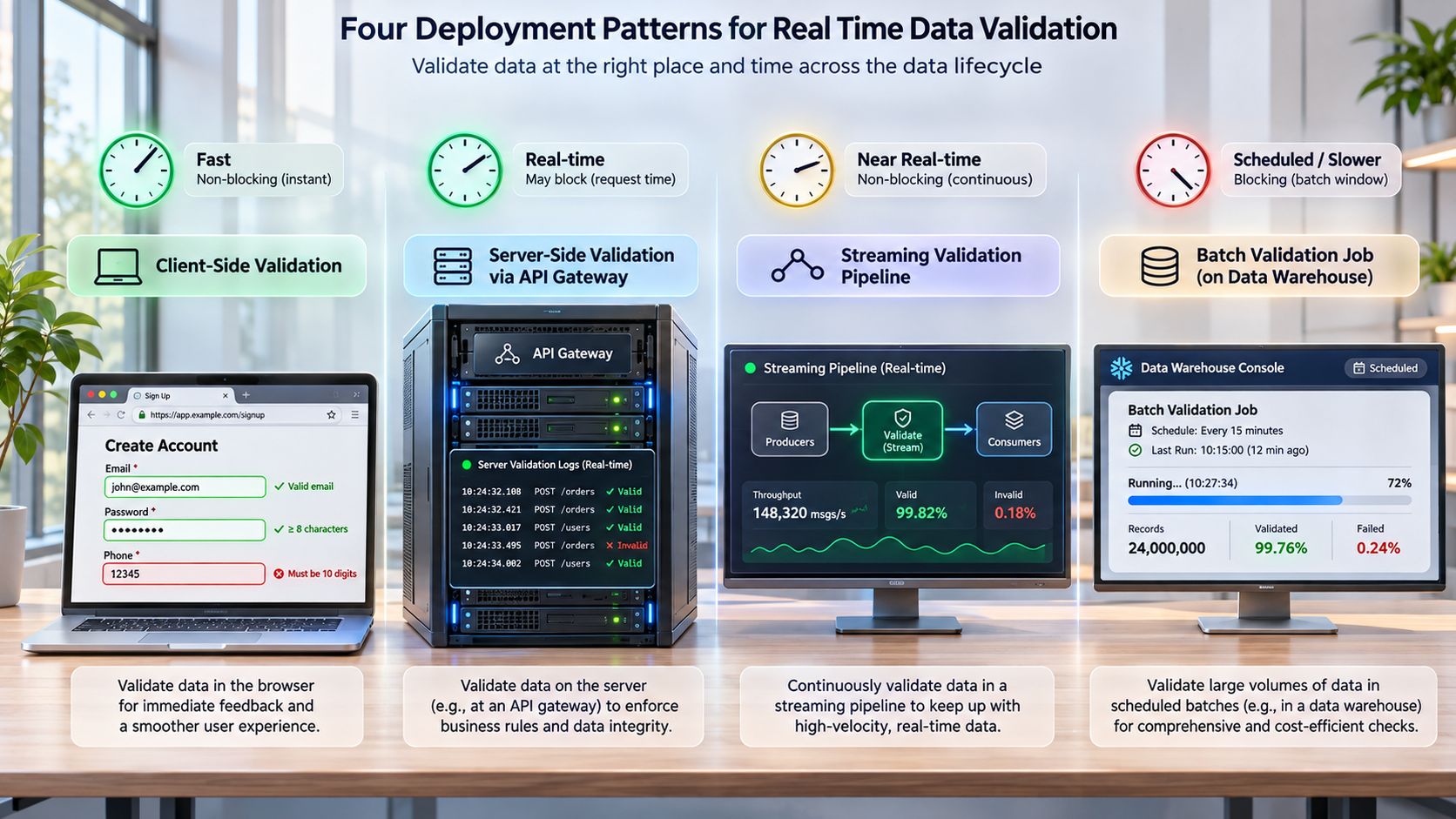
In-line validation gives you the tightest data safety because every message passes through a blocking gate before reaching downstream subscribers. The cost is end-to-end delay: if a check pauses for database lookups or complex joins, every shopper event waits behind it. Parallel and independent patterns protect the critical path so live dashboards stay snappy, but they let broken events slip into consumer views until the sidecar checker catches up and triggers a correction.
The visual breakdown below contrasts how validation placement shifts latency and detection timing across streaming architectures.
<a id="a-hybrid-pattern-for-live-shopify-activity-feeds"></a>
A Hybrid Pattern for Live Shopify Activity Feeds
You don't have to pick an all-or-nothing blocking architecture. For a live Shopify activity feed, split your rules into two tracks based on execution cost and business impact.
Keep fast, deterministic checks on the synchronous in-line path:
- Event type verification: Confirm the incoming action matches an allowed event name like
cart_add,cart_remove, orpage_view. - Cart ID format check: Verify that the unique cart identifier is present and follows your expected string structure.
- Timestamp presence: Reject or quarantine events missing a parseable ISO-8601 timestamp before they corrupt session ordering.
- Allowed action values: Confirm device categories, currency codes, and quantities stay within strict enum and numeric bounds.
Route slower, context-heavy work to a parallel asynchronous quality stream. That second track handles third-party enrichment, cross-event consistency checks (like matching a removal to an earlier addition), and statistical anomaly detection. When you design real-time data services with this two-speed split, support reps still see live carts almost instantaneously while deeper quality rules catch subtle discrepancies seconds later without stalling the pipe.
<a id="measure-tail-latency-instead-of-averages"></a>
Measure Tail Latency Instead of Averages
The benchmark research frames real-time quality checks as a latency-benchmarking problem rather than a binary choice between validation and speed. Average throughput looks healthy right up until a promo spike hits and the slowest requests time out.
Benchmark your pipeline under realistic peak traffic and track p50, p95, and p99 event-to-dashboard latency. If p50 stays fast while p99 spikes to nine seconds during a product drop, shoppers and support agents feel that nine-second stall. Watch the tail percentiles every time you add a new synchronous rule, and move any check that stretches p99 onto the asynchronous stream.
<a id="how-to-build-a-validation-contract-for-live-cart-events"></a>
How to Build a Validation Contract for Live Cart Events
A validation contract is an ongoing agreement between the producer of a live cart event and every system that reads it. Treat it like a shipping label on a parcel. The label tells the receiving team what is inside, how to handle it, and which version of the packaging rules applies. In live cart analytics, that agreement has to cover more than field types. A fast check can confirm that cart_item_added has the right shape while still missing the question that matters: does this event identify a real shopper action clearly enough to guide a support decision?
That distinction is easy to miss. A storefront can emit a valid event with a missing cart identifier, a weak consent signal, or a delayed timestamp. The schema passes, but the event cannot be joined to a live cart, enriched safely, or attributed to the right source. A contract for live cart events therefore has to protect meaning, identity and consent as well as speed.
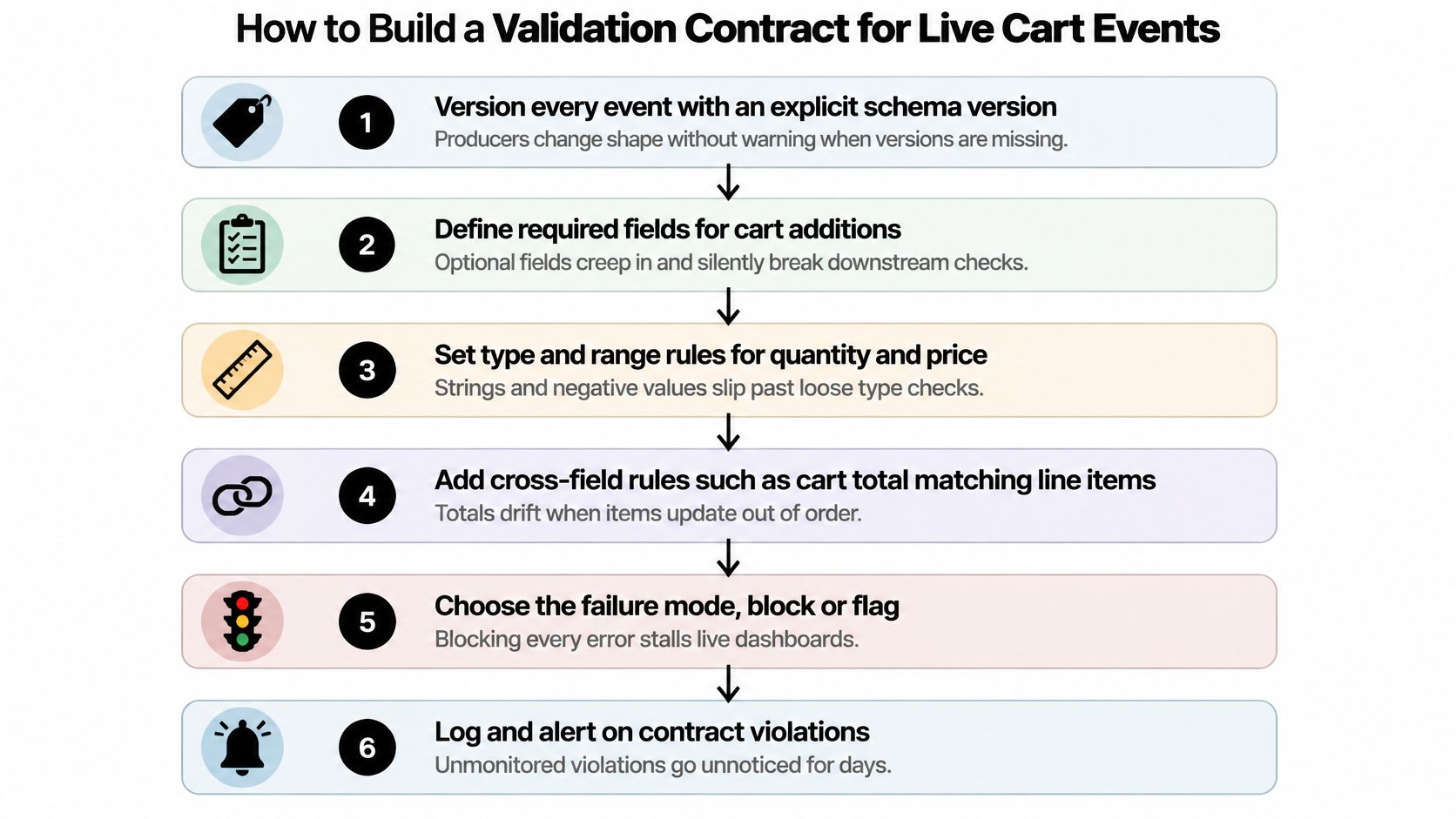
Here is a practical seven-step build sequence for a single high-impact Shopify event, cart_item_added, along with the exact slip that trips up teams at each stage.
<a id="seven-steps-from-raw-payload-to-enforced-contract"></a>
Seven Steps From Raw Payload to Enforced Contract
-
Version every event explicitly. Attach an explicit
schema_versionfield to every payload produced by your storefront or webhook handler. Producers evolve on their own release cycles, and without an explicit version tag, consumers misread renamed fields. Common slip: Assuming a single unversioned JSON payload is fine because "only one team writes it today." -
Define tight field and range constraints. Require a non-empty unique
cart_id, an ISO-8601event_timewith timezone offset, a recognizeddevice_typeoractionenum, and bounded monetary and quantity limits, such as a positive whole-number quantity capped at a realistic ceiling and a non-negative unit price. Common slip: Checking data types without ranges, which lets a zero price or negative quantity pass type validation as a valid number. -
Set evolutionary compatibility rules. Enforce backward compatibility when adding optional new fields so existing consumers keep reading messages without crashing, and forward compatibility so newer consumers safely ignore or default older versions during rolling deployments. Keep identity and consent fields stable in meaning, because a renamed flag can change how an event is interpreted even when its type still validates. Common slip: Changing an existing field's meaning in place instead of adding a new optional field.
-
Split checks across synchronous and asynchronous paths. Wire deterministic schema and field checks right at ingestion so corrupt structures never reach your live feed, and push stateful checks, such as verifying that line-item totals match the cart subtotal, to your asynchronous validation stream. Identity joins and attribution enrichment also belong on the slower path when they depend on multiple events. Common slip: Running cross-event joins synchronously and wondering why dashboard latency triples during traffic bursts.
-
Quarantine failed records instead of dropping them. Route any message that fails validation to a dead-letter queue or quarantine table, storing four essentials together: the original raw payload, the exact validation error, the producer version, and the receipt timestamp. Add the missing context that blocks reuse, such as absent identifiers, consent flags, or source parameters. Common slip: Discarding invalid events to keep dashboard error counts tidy, which permanently erases real customer demand when a frontend bug ships.
-
Replay quarantined records after fixing the bug. Once engineers patch the broken producer or register the missing enum value, run a controlled replay job against the quarantine queue and confirm every replayed event passes the active contract. Replay also gives analysts a cleaner base for how to prepare data for analysis, because they start from events that still carry their original context. Common slip: Building a quarantine bucket with no replay script, turning it into a digital landfill.
-
Monitor each quality dimension on its own alert threshold. Wire separate dashboards and alerts for timeliness, accuracy, completeness, and consistency. A technically valid
cart_item_addedpayload that arrives forty minutes late is a timeliness failure, not a schema failure. Track consent and attribution gaps separately too, since a fully formed event can still be useless for support if the shopper or source cannot be identified. Common slip: Rolling every error into one blended "data quality score," where one noisy attribution field hides a critical cart ID outage.
A healthy validation contract leaves three visible artifacts: a versioned registry entry for every event type, a quarantine queue that drains back toward zero after fixes, and a monitoring view that separates structural breaks from late or conflicting events.
<a id="metrics-that-show-whether-validation-is-working"></a>
Metrics That Show Whether Validation Is Working
Shipping validation rules is only half the engineering work. Without clear telemetry, you cannot tell whether your rules are catching real bugs, dropping valid shopper activity, or lagging behind live traffic.
Research on Big Live Data in arXiv's readCheck validation study makes a distinction every ecommerce analytics team needs: validation protects two separate forms of correctness. Current results must reflect the latest real-world state of a shopper's cart right now, while stored results must remain faithful snapshots of the state that existed at the moment they were computed. A technically valid event still drives a wrong business decision if it arrives late, gets counted twice, or gets evaluated against stale cart state.
Constraint checks such as acceptable numeric ranges and limits on implausible abrupt jumps run cheaply enough to evaluate every event in flight. That efficiency is what lets a small team monitor live stream health continuously, rather than sampling traffic once an hour and hoping the sample happened to catch the break.
| Metric | What it shows | How to read it |
|---|---|---|
| p50, p95 and p99 event-to-dashboard latency | Typical and tail delay from event to visible result | Alert on p95 and p99, not the average |
| Schema error rate | Share of events failing contract checks | A rise after a release points to a producer change |
| Quarantine volume and replay rate | Records held for review and recovered after fixes | Quarantine should drain, not grow |
| Late-event rate | Events arriving outside the timeliness window | A cluster on one source points to a slow integration |
| Duplicate rate | Events matching an earlier event ID | Should stay near zero after deduplication |
| Stale-state rate | Results computed from a state older than the latest update | A rise means dashboards show outdated carts |
Read the table as two different kinds of health. The latency and schema metrics tell you events move fast and parse cleanly; the duplicate and stale-state rates tell you whether a valid event means what you think it means. Speed works like a courier service: a guaranteed delivery window proves nothing about whether the package reached the right person. A pipeline can post a beautiful p95 while a refresh duplicate inflates your demand counts, or an anonymous browsing session splits one shopper into two in the live feed.
<a id="reading-symptoms-like-an-on-call-engineer"></a>
Reading Symptoms Like an On-Call Engineer
Metrics only pay off when each spike points directly to an owner and a next step.
A sudden jump in schema error rate right after a deploy almost always means a frontend script, a theme edit, or a third-party app changed a field format without bumping the schema version. The release tag stored on each quarantined record isolates the exact deployment within minutes.
A quarantine queue that climbs week after week signals a process breakdown, not just messy data. Either nobody owns the replay pipeline, or a validation rule is too strict for a legitimate edge case, such as a wholesale buyer placing a bulk order that exceeds a retail quantity cap.
Late events clustered around a single source point to a sluggish webhook relay, a mobile SDK batching offline clicks too aggressively, or a congested third-party tag manager. Compare the client event_time against your server receipt_time, grouped by traffic source and browser, to pinpoint the bottleneck.
A stubbornly high duplicate rate after deduplication usually means the deduplication key itself is wrong. If your pipeline keys on a random client-generated UUID that resets whenever a shopper refreshes the checkout page, identical cart actions slip past the filter as "unique" events.
A climbing stale-state rate warns you that support reps or automated widgets are acting on outdated carts. That happens when parallel enrichment workers overwrite newer cart snapshots with delayed responses from an earlier event.
<a id="set-baselines-from-your-own-store-traffic"></a>
Set Baselines From Your Own Store Traffic
Resist copying threshold numbers from another company's engineering blog. A wholesale store with ten-minute browsing sessions and complex quotes has a completely different timeliness profile than a mobile flash-sale brand. Collect two weeks of clean, audited production traffic first, calculate your normal p95 latency and baseline late-event rates across weekday and weekend peaks, and set alert thresholds just outside your own store's normal operating band.
<a id="pitfalls-edge-cases-and-decisions-for-suspect-events"></a>
Pitfalls, Edge Cases and Decisions for Suspect Events
It's often assumed that if the schema registry is strict and latency is low, live analytics are accurate. That assumption falls apart the first week real shoppers hit the store.
According to Melissa's 2025 State of Enterprise Data Quality report, 84% of organizations struggle with inaccurate or duplicate data, while 32% deal with outdated contact data, 25% face evolving regulatory requirements, and 23% contend with incomplete customer profiles. Those same enterprise fractures show up in real time across Shopify storefronts, CRMs, email tools, and analytics tags.
Look at five failure modes that pass strict JSON schema checks without a single warning:
- Inverted cart sequences: A mobile shopper taps add and immediately taps remove on spotty reception, and the
cart_removepacket reaches your server half a second beforecart_add. - Split shopper identities: A visitor browses anonymously on mobile Safari, logs into their customer account at checkout, and shows up in your live feed as two separate shoppers.
- Refresh duplicates: A customer hits reload on a slow cart drawer, firing two valid add-to-cart events with different event IDs for the same single item.
- Bot inflation: Automated price-scraping scripts trigger hundreds of clean
add_to_cartevents to check live stock levels, triggering false high-value cart alerts for your support team. - Clock skew after checkout: A shopper's laptop clock runs ten minutes fast, stamping an earlier cart edit so it appears to occur after the order was already completed.
<a id="semantic-validation-is-the-missing-layer"></a>
Semantic Validation Is the Missing Layer
Validating a broken signal in two milliseconds doesn't make your business smarter. Millisecond validation hurts decision quality if your team can't tell a real human buyer from a scraping bot, a resumed session, or a delayed duplicate.
What's missing is semantic validation: rules that evaluate what an event means in the context of the session and cart state. Semantic validation covers event ordering buffers (briefly holding an orphaned removal until its matching addition arrives), deterministic identity stitching (linking anonymous session IDs to authenticated customer IDs only upon confirmed login), content-based deduplication windows, late-data watermarks, and explicit confidence labels on every processed record.
Fast validation answers whether a payload is well-formed. Semantic validation answers whether your team should trust it enough to message a customer or trigger a discount.
<a id="four-actions-for-suspect-events"></a>
Four Actions for Suspect Events
Stop treating every incoming live event as equally actionable. When semantic checks flag an anomaly, route the event into one of four deliberate outcomes:
- Delay an out-of-order event inside a short state window (a few seconds) to see if its missing parent event arrives before you evaluate cart state.
- Quarantine records with impossible state conflicts or bot signatures so they stay out of live conversion metrics while remaining available for investigation.
- Merge confirmed duplicate clicks or newly authenticated sessions under one canonical cart and shopper record instead of inflating live visitor counts.
- Downgrade ambiguous signals with a lower confidence label so they still appear in aggregate traffic charts without firing automated sales outreach or live support alerts.
Before any workflow acts on a live event, run three quick checks: Is the event ordered cleanly against the cart's prior state? Is the shopper's identity resolved rather than guessed? And does the event timestamp agree with your server's session clock?
<a id="validating-identity-consent-and-attribution-gaps"></a>
Validating Identity, Consent and Attribution Gaps
A shopper lands on your store with strict browser privacy settings, declines marketing cookies on your banner, browses three jackets, and adds a medium rain shell to their cart. Every operational field on that cart event is spotless. The product SKU, quantity, cart total, and timestamp are all valid, yet the customer ID, click ID, and UTM attribution fields are completely blank.
Many analytics pipelines treat those blank fields as errors to hide, or worse, try to backfill them with shaky probabilistic guesses. Validation has to govern what is legitimately absent just as rigorously as what is malformed.
Privacy controls have reshaped what ecommerce teams can observe. A 2025 academic study from the UCLA Anderson School of Management on Apple's App Tracking Transparency policy found that privacy restrictions materially affect how ecommerce firms measure advertising performance, while also showing that near-real-time data helps businesses separate short-term, store-specific shifts from broader market swings. In other words, you don't need invasive individual tracking to get reliable operational visibility from your live stream, as long as your validation rules respect consent boundaries.
<a id="five-rules-for-consent-aware-stream-validation"></a>
Five Rules for Consent-Aware Stream Validation
- Validate consent state before enrichment: Inspect the user's explicit consent flags at ingestion and stamp the consent state directly onto the event record before any marketing, CRM, or third-party enrichment step runs. Aligning your event contract with solid cookie consent management prevents accidental enrichment of opted-out visitors.
- Label consent-limited sessions clearly: Tag sessions that lack tracking permission with a dedicated status (such as
consent_restricted) and exclude them from individual customer-level counts until the shopper voluntarily logs in or grants consent. - Mark attribution as incomplete instead of fabricating certainty: When ad click identifiers or referrer headers are stripped by the browser, record
attribution_status: incompleterather than defaulting everything to "Direct" traffic and distorting your marketing ROI reports. - Separate operational cart data from identity data: Keep core cart telemetry (cart ID, line items, page friction, checkout step) logically separate from personal identifiers. Support and merchandising teams can troubleshoot a stalled cart or spot a broken coupon field without storing unauthorized personal profiles.
- Fall back to cohort and aggregate metrics: When individual identifiers are missing, validate and monitor operational metrics that stay accurate without tracking individuals: cart progression rates, product-level removal friction, and aggregate session conversion.
<a id="how-dashboards-should-show-unmatched-sessions"></a>
How Dashboards Should Show Unmatched Sessions
Never bury consent-limited traffic inside a blended conversion chart. Report matched and unmatched sessions side by side on your operational dashboard. If Safari or a privacy browser rolls out a stricter cookie rule next month, your match rate will dip even while real cart volume stays flat; plotting both series prevents your marketing team from mistaking an attribution gap for a sudden drop in buyer demand.
Stick to one clear rule whenever consent or identity is missing: downgrade the event to a session-level observation, never a customer-level fact. Privacy-preserving validation trims individual-level visibility, yet it raises trust in every metric that reaches your leadership team.
<a id="choose-your-validation-stack-and-start-with-one-check"></a>
Choose Your Validation Stack and Start With One Check
The right validation stack depends on who runs your store and how much pipeline infrastructure your team owns. Picking an enterprise stream engine when you only need clean cart visibility burns engineering months; relying on raw browser scripts when you run five storefronts creates silent reporting drift.
<a id="two-starting-paths-based-on-team-setup"></a>
Two Starting Paths Based on Team Setup
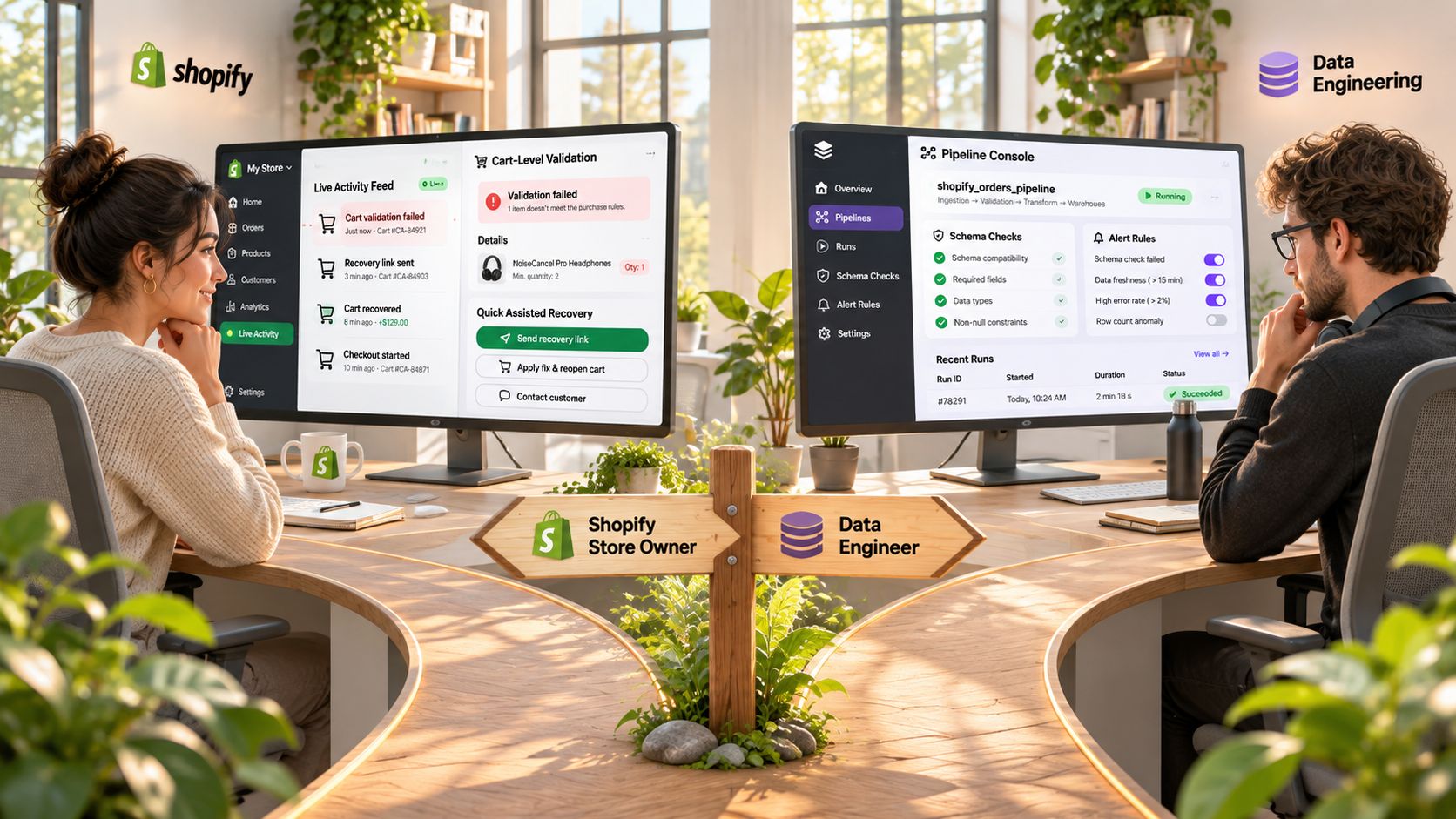
If you operate a Shopify storefront focused on conversion, merchandising, and assisted checkout recovery, start with a managed live activity feed and a cart-level view rather than building custom Kafka clusters from scratch. For example, Cart Whisper | Live View Pro gives Shopify merchants a live activity feed showing visitors, cart changes, and shopping activity in real time, including which products customers view, what they add to and remove from their carts, and where they hesitate or get stuck. Its Cart ID feature lets your team open a customer's exact cart to help them finish an order, and every activity log can be exported as CSV for deeper auditing in Excel or Google Sheets.
If you have a dedicated data engineering team operating custom pipelines across multiple storefronts, ERPs, and warehouses, start with a stream processor paired with a schema registry (such as Confluent Schema Registry with Apache Flink or ksqlDB). Enforce strict payload versions at ingestion, split synchronous and asynchronous checks, and wire dead-letter queues into your incident workflow.
Whichever path you pick, follow one clean integration pattern: connect your validated live feed to your CRM or customer support desk using the unique cart identifier as the join key. That gives agents an unambiguous handle on the live cart without guessing at fragile email or IP matches.
<a id="no-tool-replaces-clear-business-rules"></a>
No Tool Replaces Clear Business Rules
Buying a live feed or deploying a schema registry won't decide your business definitions for you. Your team still has to agree in writing on what counts as a unique active shopper, how long a late event remains valid, which anomalies get quarantined, and when an anonymous cart should stay session-only.
Start small this week instead of drafting a six-month data governance roadmap. Pick one high-impact event type (such as add_to_cart or cart_remove), run it against the four quality dimensions of timeliness, accuracy, completeness, and consistency, and route every failing payload into a quarantine log for seven full days. At the end of the week, open that quarantine log alongside your live dashboard and verify whether your stream matches what real shoppers did on your store.
If you want immediate visibility into live Shopify shopper behavior without building a streaming pipeline from scratch, Cart Whisper | Live View Pro gives your team a real-time activity feed, unique Cart IDs for assisted checkout recovery, and clean CSV exports so you can spot cart friction and verify shopper journeys as they happen. Install the app on your store to turn live cart signals into reliable, actionable support and conversion wins.